>_Programming Partner
Loading technical insights...
Loading technical insights...
Software Developer
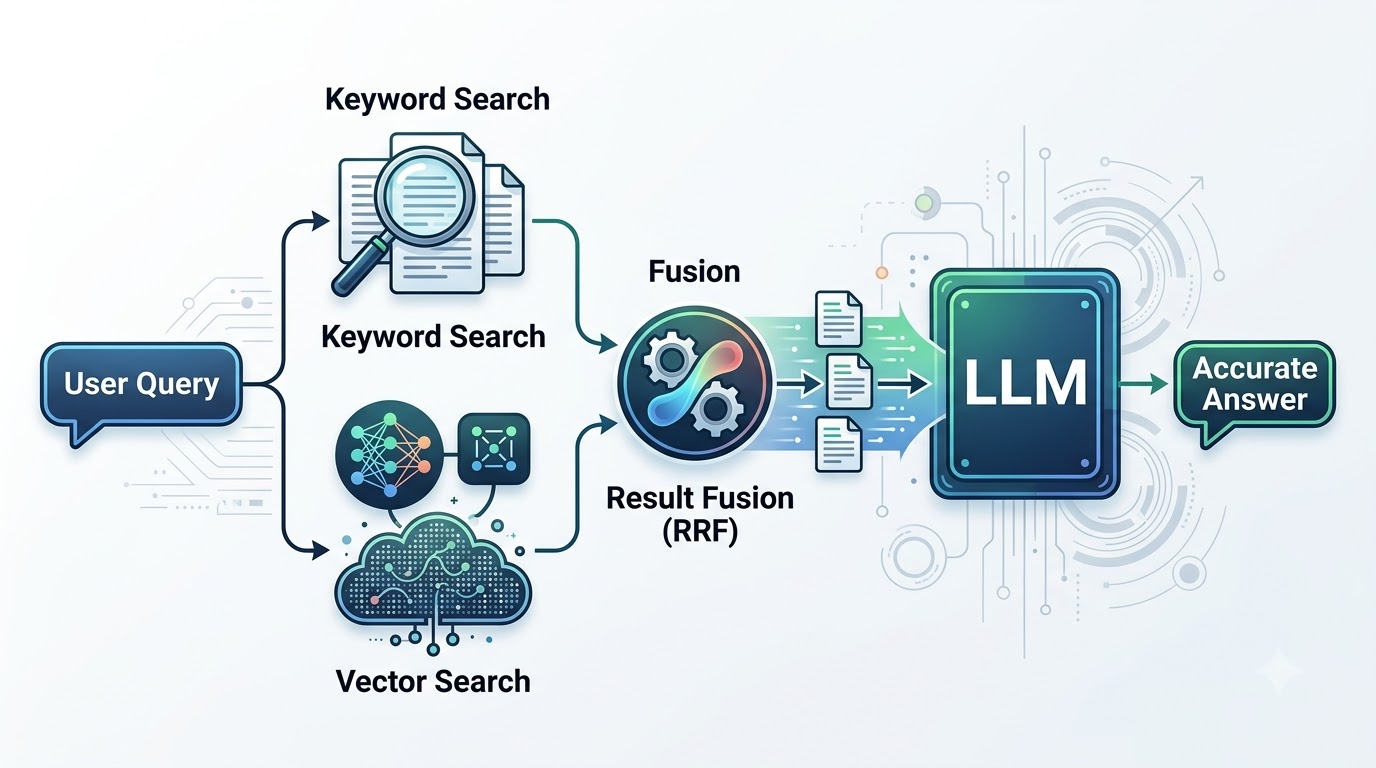
Retrieval Augmented Generation (RAG) systems have revolutionized how Large Language Models (LLMs) access and utilize external knowledge. Basic RAG often relies solely on vector or semantic search to find relevant information. While powerful, this approach can sometimes miss crucial details.
Semantic search excels at understanding the meaning and context of a query, but it might overlook exact keywords, product names, IDs, or specific error messages. This can lead to less precise or incomplete answers from the LLM. Hybrid search addresses this by combining the strengths of both semantic and lexical matching.
By integrating vector search with traditional keyword search, hybrid retrieval significantly improves the quality of retrieved documents. This ensures that LLMs receive the most accurate and contextually rich information, leading to superior response generation.
Hybrid search is a sophisticated retrieval technique that leverages multiple search methodologies simultaneously. It aims to overcome the limitations of any single search approach by combining their respective strengths. The core idea is to get the best of both worlds: precise keyword matching and nuanced semantic understanding.
Its two main components are keyword search and vector search. Keyword search focuses on exact term matching, while vector search identifies semantically similar content. For example, if a user asks, "What are the features of the 'Pro-X5' model and how does it handle low light?", a pure vector search might prioritize documents about low-light photography but miss specific details about 'Pro-X5'. Hybrid search ensures both aspects are covered.
| Feature | Keyword Search (Lexical) | Vector Search (Semantic) |
|---|---|---|
| Matching Logic | Exact term matching, stemming, synonyms | Meaning, context, conceptual similarity |
| Strengths | Precise for specific terms, IDs, names | Understands intent, handles synonyms, related concepts |
| Weaknesses | Fails on synonyms, rephrased queries | Can miss exact matches, specific codes, rare terms |
| Example Query | 'Python 3.9 installation error' | 'How to set up Python on my computer' |
| Underlying Tech | BM25, TF-IDF, inverted index | Embeddings, neural networks, vector databases |
While vector search is excellent for capturing the semantic meaning of a query, it has inherent limitations. It can struggle with highly specific or unique identifiers that don't have strong semantic neighbors in the embedding space. This includes things like product codes, specific names, error messages, version numbers, or technical identifiers.
Consider a query like "What is the error code E-404-DB?" A pure vector search might retrieve documents about general database errors, but completely miss the one document containing the exact E-404-DB code. This happens because the embedding of E-404-DB might not be semantically close to general database error embeddings, even if the document is highly relevant.
In such cases, relying solely on semantic retrieval can lead to the LLM hallucinating or providing generic, unhelpful responses. The relevant document, despite containing the exact keyword, might be ranked low or entirely missed. Hybrid search mitigates this risk by ensuring lexical matches are also considered.
The hybrid search retrieval pipeline is designed to maximize the chances of finding the most relevant information for any given query. It orchestrates both keyword and vector search in a coordinated manner. This parallel execution ensures comprehensive coverage of both lexical and semantic aspects of the query.
The process begins when a user submits a query. This query is then simultaneously fed into two distinct retrieval systems: one for keyword search and one for vector search. Each system independently retrieves a set of candidate documents or document chunks.
Once both sets of results are obtained, they are combined and re-ranked using a fusion algorithm. This unified ranking produces a single list of the most relevant documents. Finally, the top-ranked document chunks are passed to the LLM for generating a precise and informed answer.
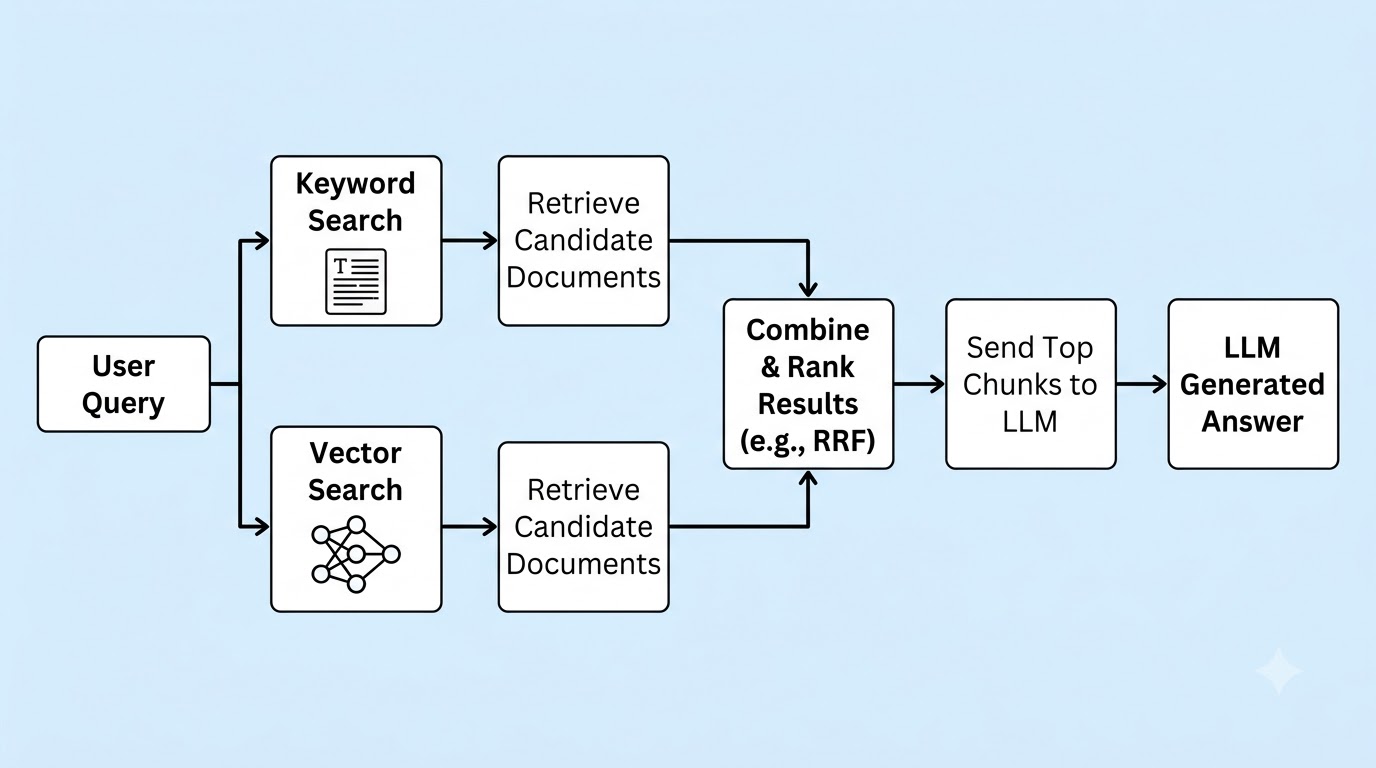
After executing both keyword and vector searches, you'll have two separate lists of ranked documents. The crucial next step is to combine these lists into a single, unified ranking that leverages the strengths of both. Several approaches exist for this fusion process.
One simple method is weighted score combination, where you assign a weight to the scores from each search type and sum them up. However, this requires careful tuning of weights and assumes comparable scoring scales. A more robust and widely used method is Reciprocal Rank Fusion (RRF).
RRF is a rank-based fusion algorithm that doesn't require score normalization or parameter tuning. It assigns a score to each document based on its reciprocal rank in each individual search result list. Documents that appear high in multiple lists receive a significantly higher combined score.
RRF works by giving more importance to documents that are ranked highly by at least one of the retrieval methods. The formula for the RRF score for a document d is: Score(d) = sum(1 / (rankᵢ(d) + k)) for each search method i. Here, rankᵢ(d) is the rank of document d in the results of search method i, and k is a constant (typically 60) that smooths the contribution of lower-ranked documents.
Let's consider an example. Suppose keyword search ranks documents A, B, C (ranks 1, 2, 3) and vector search ranks documents C, A, D (ranks 1, 2, 3). With k=60:
Document A: Keyword Rank = 1, Vector Rank = 2. RRF Score = 1/(1+60) + 1/(2+60) = 0.01639 + 0.01613 = 0.03252
Document B: Keyword Rank = 2, Vector Rank = None. RRF Score = 1/(2+60) + 0 = 0.01613
Document C: Keyword Rank = 3, Vector Rank = 1. RRF Score = 1/(3+60) + 1/(1+60) = 0.01587 + 0.01639 = 0.03226
Document D: Keyword Rank = None, Vector Rank = 3. RRF Score = 0 + 1/(3+60) = 0.01587
In this example, the combined RRF ranking would be A, C, B, D. Notice how document A, which was highly ranked by both, gets the top spot, and C, also highly ranked by both (though with different individual ranks), comes next. RRF effectively prioritizes documents that are consistently relevant across different retrieval methods.
def reciprocal_rank_fusion(rank_lists, k=60):
    """
    Applies Reciprocal Rank Fusion (RRF) to a list of ranked document lists.

    Args:
        rank_lists (list[list[str]]): A list where each inner list represents
                                      results from a search method, ordered by rank.
        k (int): A constant for smoothing the reciprocal rank calculation.

    Returns:
        list[str]: A single list of documents, re-ranked by RRF score.
    """
    fused_scores = {
    # Iterate through each search method's ranked list
    for ranks in rank_lists:
        # Iterate through each document and its rank in the current list
        for rank, docᵢd in enumerate(ranks, start=1):
            # Calculate RRF score for the document
            fused_scores[docᵢd] = fused_scores.get(docᵢd, 0) + (1 / (k + rank))

    # Sort documents by their fused RRF scores in descending order
    sorted_docs = sorted(fused_scores.items(), key=lambda item: item[1], reverse=True)
    return [docᵢd for docᵢd, score in sorted_docs]

# Example usage:
keyword_ranks = ['doc_A', 'doc_B', 'doc_C']
vector_ranks = ['doc_C', 'doc_A', 'doc_D']

fused_results = reciprocal_rank_fusion([keyword_ranks, vector_ranks])
print(f"Fused RRF results: {fused_results")
# Expected output: Fused RRF results: ['doc_A', 'doc_C', 'doc_B', 'doc_D']Let's put theory into practice by building a simple hybrid search system using Python and Qdrant. Qdrant is an open-source vector database that also offers powerful filtering capabilities, which we can leverage for keyword search. This practical example will demonstrate how to perform both types of retrieval and combine their results.
We will simulate a scenario where we have a collection of documents, each with a text payload and a vector embedding. Our goal is to query this collection using both semantic similarity and keyword matching, then fuse the results. This setup is typical for many RAG applications.
First, we need to install the necessary Python libraries. We'll use qdrant-client to interact with Qdrant and sentence-transformers to generate embeddings for our text data. Ensure you have a running Qdrant instance, either locally or in the cloud.
pip install qdrant-client sentence-transformersNext, we'll initialize the Qdrant client and prepare some sample text data. Each document will have a unique ID, the actual text content, and its corresponding vector embedding. We'll create a collection in Qdrant to store this information.
from qdrant_client import QdrantClient, models
from sentence_transformers import SentenceTransformer

# Initialize Qdrant client (replace with your Qdrant instance details if not local)
client = QdrantClient(host="localhost", port=6333)

# Initialize embedding model
model = SentenceTransformer('all-MiniLM-L6-v2')

collectionₙame = "hybrid_rag_docs"
vector_size = model.get_sentence_embedding_dimension()

# Sample data
documents = [
    {"id": "doc1", "text": "The latest iPhone 15 Pro Max features a new A17 Bionic chip and improved camera system.", "category": "electronics",
    {"id": "doc2", "text": "Troubleshooting common error code E-404-DB in database connections.", "category": "tech_support",
    {"id": "doc3", "text": "Learn about advanced Python programming techniques and best practices for web development.", "category": "programming",
    {"id": "doc4", "text": "Comparing the specifications of Samsung Galaxy S23 Ultra and iPhone 15 Pro Max.", "category": "electronics",
    {"id": "doc5", "text": "Fixing 'ModuleNotFoundError' in Python 3.9 environments.", "category": "programming",
    {"id": "doc6", "text": "Customer support guide for product model X-Y-Z-2023.", "category": "customer_service"
]

# Create collection if it doesn't exist
client.recreate_collection(
    collectionₙame=collectionₙame,
    vectors_config=models.VectorParams(size=vector_size, distance=models.Distance.COSINE),
)

# Prepare points for Qdrant
points = []
for doc in documents:
    embedding = model.encode(doc["text"]).tolist()
    points.append(
        models.PointStruct(
            id=doc["id"],
            vector=embedding,
            payload={"text": doc["text"], "category": doc["category"]
        )
    )

# Upsert points to Qdrant
client.upsert(collectionₙame=collectionₙame, points=points, wait=True)
print(f"Indexed {len(documents) documents into '{collectionₙame' collection.")For keyword search, we can leverage Qdrant's payload filtering capabilities. While Qdrant is primarily a vector database, its filtering allows us to search for exact terms within the document payloads. We'll perform a simple text match on the text field of our documents.
This approach simulates a basic keyword search, where we look for documents containing specific words or phrases. For more advanced lexical search (like BM25), you might integrate with a dedicated search engine like Elasticsearch or OpenSearch, then combine results with Qdrant's vector search.
# Continued from previous block - requires the setup above

def perform_keyword_search(query_text: str, collectionₙame: str, limit: int = 5) -> list[str]:
    """
    Performs a keyword search using Qdrant's payload filtering.
    This simulates keyword matching by looking for exact terms in the 'text' payload.
    """
    # Split query into words and create a filter condition for each word
    # This is a simple simulation; real keyword search might use more advanced tokenization/indexing
    query_words = query_text.lower().split()

    # Create a filter that checks if the 'text' field contains any of the query words
    # For simplicity, we'll check for any word. For exact phrase, more complex logic is needed.
    should_conditions = []
    for word in query_words:
        should_conditions.append(
            models.FieldCondition(
                key="text",
                match=models.MatchText(text=word)
            )
        )

    if not should_conditions:
        return []

    # Perform the search with the filter
    search_result = client.scroll(
        collectionₙame=collectionₙame,
        scroll_filter=models.Filter(should=should_conditions),
        limit=limit,
        with_payload=True,
        with_vectors=False
    )

    # Extract document IDs from the search results
    keyword_results = [point.id for point, _ in search_result]
    print(f"Keyword search for '{query_text': {keyword_results")
    return keyword_results

# Example keyword search
keyword_query = "iPhone 15 Pro Max error"
keyword_docs = perform_keyword_search(keyword_query, collectionₙame)Next, we'll implement the vector (semantic) search component using Qdrant. This involves embedding the user's query into a vector space and then finding the most semantically similar document vectors in our collection. Qdrant is highly optimized for this task, allowing for fast and accurate similarity searches.
The search method in Qdrant takes the query vector and returns points (documents) ordered by their similarity score. This is the core of semantic retrieval, identifying documents that convey similar meaning to the query, even if they don't share exact keywords.
# Continued from previous block - requires the setup above

def perform_vector_search(query_text: str, collectionₙame: str, limit: int = 5) -> list[str]:
    """
    Performs a vector (semantic) search using Qdrant.
    """
    # Embed the query text into a vector
    query_vector = model.encode(query_text).tolist()

    # Perform vector search
    search_result = client.search(
        collectionₙame=collectionₙame,
        query_vector=query_vector,
        limit=limit,
        with_payload=True,
        with_vectors=False
    )

    # Extract document IDs from the search results
    vector_results = [point.id for point in search_result]
    print(f"Vector search for '{query_text': {vector_results")
    return vector_results

# Example vector search
vector_query = "latest smartphone models"
vector_docs = perform_vector_search(vector_query, collectionₙame)Now that we have both keyword and vector search results, we can apply the Reciprocal Rank Fusion (RRF) algorithm to combine them. This will give us a single, robustly ranked list of documents. The RRF function we defined earlier will be used here.
The combined list represents the most relevant documents according to both lexical and semantic criteria. These top documents are then ready to be passed to an LLM for context-aware answer generation. This final step completes the hybrid retrieval process within a RAG pipeline.
# Continued from previous block - requires the setup above and the reciprocal_rank_fusion function

def hybrid_search_rag(query: str, collectionₙame: str, top_k: int = 3) -> list[dict]:
    """
    Performs hybrid search (keyword + vector) and returns top documents for RAG.
    """
    print(f"\nPerforming hybrid search for query: '{query'")

    # 1. Perform Keyword Search
    keyword_resultsᵢds = perform_keyword_search(query, collectionₙame, limit=10)

    # 2. Perform Vector Search
    vector_resultsᵢds = perform_vector_search(query, collectionₙame, limit=10)

    # 3. Apply Reciprocal Rank Fusion
    fused_documentᵢds = reciprocal_rank_fusion([keyword_resultsᵢds, vector_resultsᵢds])
    print(f"Fused RRF document IDs: {fused_documentᵢds")

    # 4. Retrieve full payload for the top_k fused documents
    final_documents = []
    for docᵢd in fused_documentᵢds[:top_k]:
        # Fetch the full document payload from Qdrant
        # In a real RAG system, you might fetch chunks directly or use a document store
        retrieved_point = client.retrieve(collectionₙame=collectionₙame, ids=[docᵢd], with_payload=True, with_vectors=False)
        if retrieved_point:
            final_documents.append({"id": docᵢd, "text": retrieved_point[0].payload["text"])

    print(f"Top {top_k documents for LLM: {final_documents")
    return final_documents

# Example RAG query with hybrid search
query₁ = "iPhone 15 Pro Max features and comparisons"
retrieved_docs₁ = hybrid_search_rag(query₁, collectionₙame)

query₂ = "Fixing Python ModuleNotFoundError in version 3.9"
retrieved_docs₂ = hybrid_search_rag(query₂, collectionₙame)

query₃ = "What is error code E-404-DB?"
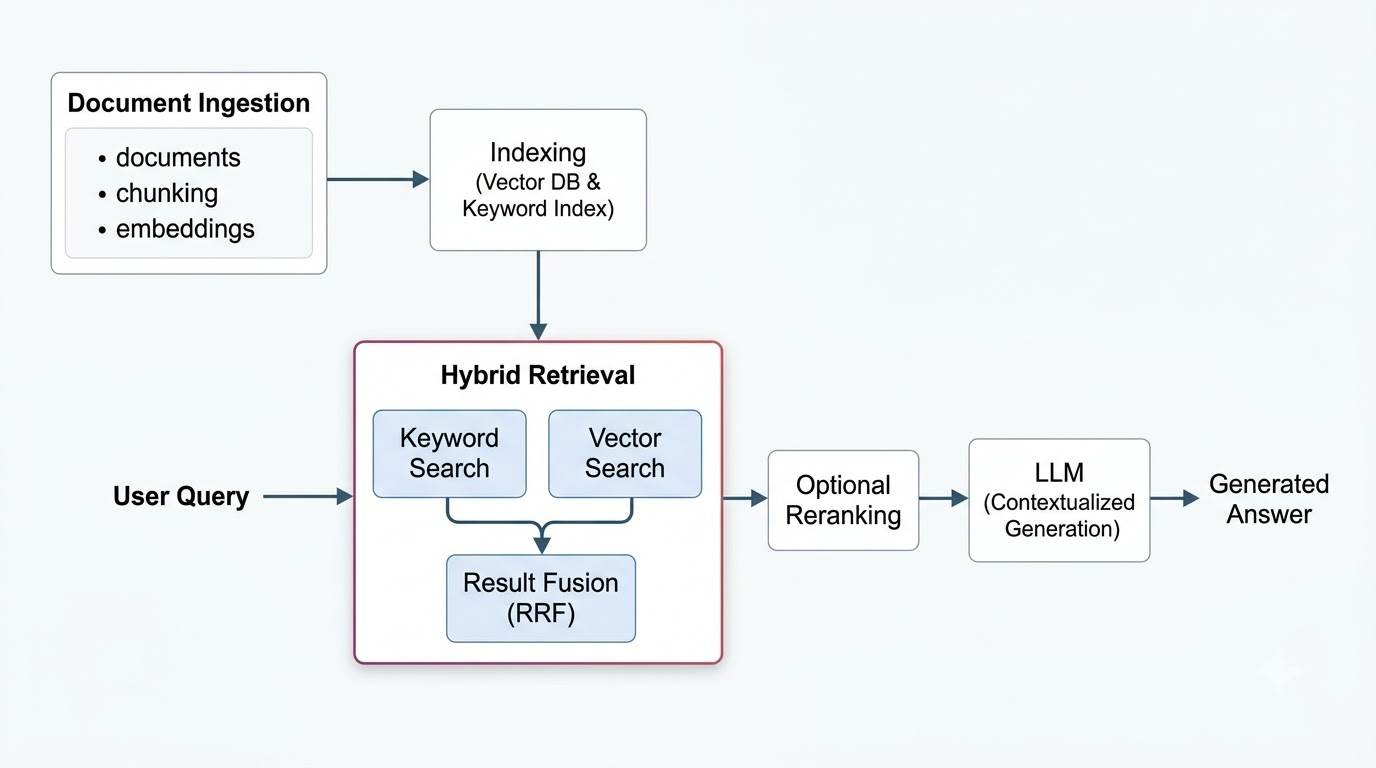
retrieved_docs₃ = hybrid_search_rag(query₃, collectionₙame)Hybrid search is a critical enhancement within the broader RAG architecture. It fits seamlessly into the retrieval phase, acting as a more intelligent mechanism for sourcing relevant information. The overall RAG pipeline starts with document ingestion and processing.
Documents are chunked into manageable pieces, embedded into vectors, and then indexed in a vector database like Qdrant. When a user query arrives, the hybrid retrieval component takes over, performing both keyword and vector searches. The fused results are then often passed through an optional reranking step to further refine relevance.
Finally, the most relevant document chunks are sent to the LLM as context. This enriched context allows the LLM to generate highly accurate, relevant, and factually grounded answers. Improving retrieval quality directly translates to a significant boost in the overall performance and reliability of the RAG system.
Deciding between hybrid search and pure vector search depends heavily on your application's specific requirements and the nature of your data. Both have their merits, but hybrid search often provides a more robust solution for complex scenarios. Understanding their differences helps in making an informed choice.
Pure vector search is simpler to implement and can be very effective for queries that are purely semantic, where exact keyword matches are less critical. However, for applications dealing with diverse query types, hybrid search offers a significant advantage. It ensures that no relevant information is missed, whether it's a conceptual query or a precise identifier.
| Dimension | Pure Vector Search | Hybrid Search |
|---|---|---|
| Semantic Understanding | Excellent | Excellent (enhanced by lexical context) |
| Exact Matching | Poor (can miss specific terms) | Excellent (combines lexical precision) |
| Technical Queries | Can struggle with codes/IDs | Robust (finds exact terms and concepts) |
| Implementation Complexity | Lower | Higher (managing two search types, fusion) |
| Latency | Generally lower | Slightly higher (parallel execution, fusion) |
| Retrieval Quality | Good for semantic queries | Superior for diverse, complex queries |
Hybrid search shines in applications where both conceptual understanding and precise factual recall are paramount. Many real-world systems benefit significantly from this dual approach. It ensures that users can find what they need, regardless of how they phrase their query.
Consider enterprise document search, where users might look for a policy by its name (exact match) or by its purpose (semantic). E-commerce product search is another prime example, balancing queries like "red running shoes" (semantic) with "SKU: 12345" (exact). Customer support knowledge bases need to handle both "my internet is slow" and "error code 0x80070005" effectively.
Developer documentation, legal documents, healthcare information systems, and product catalogs all contain a mix of natural language concepts and highly specific, exact terms. In these domains, hybrid search ensures comprehensive and accurate retrieval, leading to better user experiences and more reliable LLM outputs.
Implementing hybrid search is a significant step, but continuous optimization is key to unlocking its full potential. The effectiveness of your hybrid RAG system depends on several factors beyond just combining search results. A well-tuned pipeline ensures maximum relevance and efficiency.
Consider refining your chunking strategies to create optimal document segments for both keyword and vector indexing. The choice of embedding model is also crucial; experiment with different models to find one that best captures the semantic nuances of your domain. Tuning the weights for keyword and vector search, or the k constant in RRF, can further enhance result fusion.
Leveraging metadata filtering can add another layer of precision, allowing you to narrow down search results based on specific attributes. Query expansion techniques, where the original query is augmented with synonyms or related terms, can improve both search components. Finally, post-retrieval reranking, using a more sophisticated model, can provide the ultimate refinement to the retrieved documents before they reach the LLM. Hybrid search is powerful, but its true strength emerges when integrated into a carefully configured and continuously evaluated retrieval pipeline.
Hybrid search represents a significant leap forward in RAG system capabilities. By intelligently combining the precision of lexical matching with the contextual understanding of semantic search, it addresses the limitations of single-method retrieval. This dual approach ensures that LLMs receive the most comprehensive and accurate context possible.
The benefits are clear: more reliable, robust, and accurate LLM responses across a wider range of diverse and complex queries. Whether you're dealing with technical documentation, product catalogs, or general knowledge bases, hybrid search provides a powerful mechanism to elevate your RAG application's performance. It's an essential technique for building truly intelligent AI assistants.
As you continue to explore advanced RAG techniques, consider diving deeper into topics like reranking, advanced query understanding, and multi-modal RAG. These build upon the foundational improvements offered by hybrid search, pushing the boundaries of what LLMs can achieve with external knowledge.
Hybrid search generally incurs slightly higher latency than pure vector search because it involves executing two distinct retrieval mechanisms (keyword and vector) in parallel and then merging their results. However, this overhead is often negligible for most applications, especially when the performance gains in retrieval quality significantly outweigh the minor increase in processing time. Modern vector databases are optimized to handle both types of queries efficiently.
Selecting an appropriate embedding model is crucial for the vector search component of hybrid retrieval. Consider models trained on diverse datasets that align with your domain-specific language and use cases. Evaluate models based on their performance on semantic similarity tasks relevant to your data, often through metrics like Mean Reciprocal Rank (MRR) or Recall@k. Experimentation with different models and fine-tuning can yield the best results for your specific RAG application.
Absolutely, hybrid search works synergistically with many other RAG optimization techniques. Query rewriting, for instance, can enhance the initial user query before it even enters the hybrid retrieval pipeline, making both keyword and vector searches more effective. Techniques like reranking, context compression, and advanced prompt engineering can further refine the documents retrieved by hybrid search, leading to even more accurate and relevant LLM responses. Combining these methods creates a robust and highly performant RAG system.
Scaling hybrid search involves managing large indices for both keyword and vector data, ensuring low-latency retrieval for both components, and efficiently merging results from potentially distributed systems. Data synchronization between keyword and vector indices, optimizing the RRF constant (k), and monitoring the performance of both search types are key challenges. Choosing a vector database that natively supports both capabilities, like Qdrant, can significantly simplify scaling efforts.
Harness Claude AI agents to create intelligent, autonomous workflows. Discover how to design, deploy, and adapt AI systems for powerful real-world automation
Discover how to earn $1000 monthly leveraging Claude Co-work. This guide shows normal people how to start a profitable content creation business step-by-step
Find the top AI transcription APIs for Indian languages like Hindi, Gujarati, and Tamil. We compare accuracy, speed, features, and pricing to guide your choice