>_Programming Partner
Loading technical insights...
Loading technical insights...
Software Developer
Retrieval-Augmented Generation (RAG) has revolutionized how Large Language Models (LLMs) interact with real-world, dynamic information. At its core, RAG enhances an LLM's ability to generate accurate and contextually relevant responses by first retrieving pertinent information from an external knowledge base. Think of it as giving your LLM a super-powered research assistant that can instantly find the most relevant facts before the LLM formulates an answer. This approach significantly reduces the notorious problem of LLM 'hallucinations' – where models generate plausible but incorrect information – and grounds their responses in verifiable data.
While RAG offers immense potential for building intelligent AI applications, deploying these systems in a production environment introduces a unique set of challenges. It's not just about connecting a vector database to an LLM; it's about building a robust, scalable, and reliable pipeline that can handle real-world demands. Key considerations for production RAG include:
A well-designed RAG architecture is crucial for addressing these challenges, transforming a proof-of-concept into a resilient, high-performing AI solution. This deep dive will guide you through the essential components and best practices for building such a system.
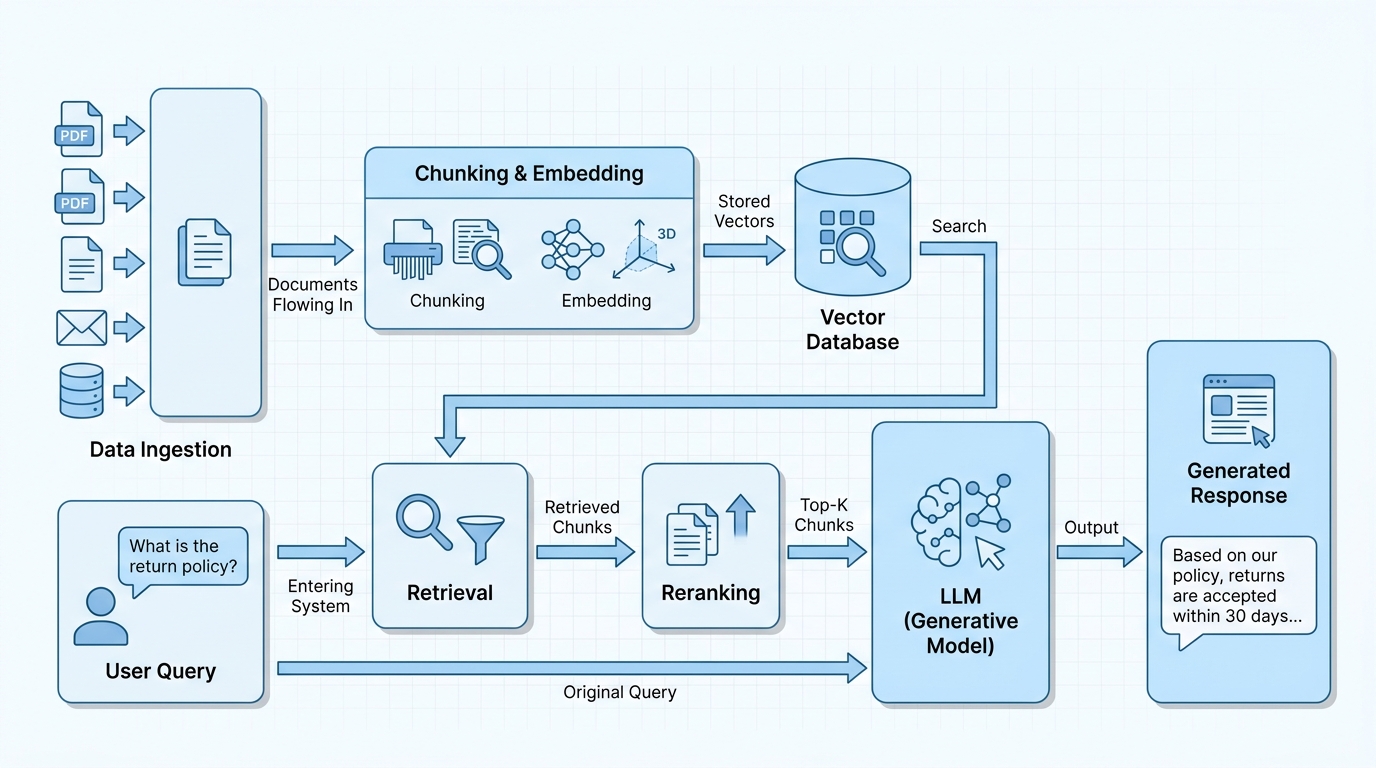
A production-grade RAG pipeline is a sophisticated orchestration of several interconnected components, each playing a vital role in delivering accurate and contextually rich responses. Understanding these building blocks and how they interact is fundamental to designing an effective system. Here’s a breakdown of the core stages:
These components work in concert, forming a powerful feedback loop that allows LLMs to access and leverage vast amounts of external knowledge. Here's a high-level architectural diagram illustrating this flow:
The quality of your RAG system heavily depends on how you prepare your data. A common mistake is to simply split documents into fixed-size chunks without considering their content. This 'naive' text splitting often leads to problems:
This is where semantic chunking comes in. Semantic chunking aims to create chunks that are self-contained, coherent, and semantically meaningful. The goal is to ensure that each chunk represents a complete thought, idea, or topic, maximizing the chances of retrieving relevant and useful context for the LLM. Here are some popular strategies:
Let's look at a Python example using LangChain's RecursiveCharacterTextSplitter, a widely used and effective method for semantic chunking.
from langchain.text_splitter import RecursiveCharacterTextSplitter

def get_semantic_chunks(text: str, chunk_size: int = 1000, chunk_overlap: int = 200):
    """
    Splits a given text into semantically meaningful chunks using RecursiveCharacterTextSplitter.
    """
    # Initialize the RecursiveCharacterTextSplitter
    # It tries to split on different characters in order to keep chunks semantically coherent.
    # Default separators are ["\n\n", "\n", " ", ""]
    text_splitter = RecursiveCharacterTextSplitter(
        chunk_size=chunk_size,
        chunk_overlap=chunk_overlap,
        length_function=len, # Use standard Python len() for character count
        add_start_index=True # Add metadata about the start index of each chunk
    )

    # Create documents (chunks) from the text
    chunks = text_splitter.create_documents([text])

    return chunks

# Example Usage:
long_document_text = (
    "The quick brown fox jumps over the lazy dog. This is a classic sentence used for testing. "
    "It contains all letters of the alphabet, making it a pangram. "
    "However, in the context of large language models, chunking strategies are far more complex. "
    "Semantic chunking aims to preserve the meaning and context within each segment. "
    "This is crucial for Retrieval-Augmented Generation (RAG) systems to function effectively. "
    "Without proper chunking, the retrieved context might be fragmented or irrelevant, "
    "leading to poor quality responses from the LLM. "
    "Different chunking methods exist, from simple fixed-size splits to advanced semantic approaches. "
    "Choosing the right strategy depends on the nature of your data and the specific requirements of your RAG application."
)

# Get chunks with a size of 200 characters and an overlap of 50 characters
processed_chunks = get_semantic_chunks(long_document_text, chunk_size=200, chunk_overlap=50)

print(f"Generated {len(processed_chunks)} chunks.")
for i, chunk in enumerate(processed_chunks):
    print(f"\n--- Chunk {i+1} (Start Index: {chunk.metadata['start_index']}) ---")
    print(chunk.page_content)
This RecursiveCharacterTextSplitter is a good starting point because it prioritizes keeping logical units (like paragraphs) together. For even more advanced semantic chunking, you might explore techniques that analyze embedding similarity between sentences to determine optimal split points, ensuring that each chunk truly represents a cohesive idea.
Once your data is semantically chunked and transformed into high-dimensional embeddings, you need a place to store them and, more importantly, efficiently query them. This is the critical role of a vector database. Unlike traditional databases that store structured data and perform exact matches, vector databases are purpose-built for storing vector embeddings and executing similarity searches.
How do they work? At their core, vector databases employ specialized indexing algorithms to organize these high-dimensional vectors. Common indexing techniques include:
Choosing the right vector database for production needs involves considering several factors:
Popular choices include Pinecone, Weaviate, Qdrant (managed cloud services), and Chroma (can be embedded or run as a server). For our example, we'll use Chroma, which is excellent for local development and can scale to production needs.
import chromadb
from chromadb.utils import embedding_functions

def initialize_and_populate_vector_db(chunks: list, collection_name: str = "rag_documents"):
    """
    Initializes a ChromaDB client, creates a collection, and populates it with document chunks.
    """
    # Initialize a persistent ChromaDB client (data will be stored on disk)
    # For production, you might use a client connecting to a remote Chroma server or other vector DB.
    client = chromadb.PersistentClient(path="./chroma_db")

    # Define an embedding function. For simplicity, we'll use a basic Sentence Transformer model.
    # In production, you'd use a more robust model like OpenAI's embeddings or Cohere's.
    # Make sure to install 'sentence-transformers' if using this embedding function.
    sentence_transformer_ef = embedding_functions.SentenceTransformerEmbeddingFunction(model_name="all-MiniLM-L6-v2")

    # Create a collection. If it already exists, get it.
    try:
        collection = client.get_or_create_collection(
            name=collection_name,
            embedding_function=sentence_transformer_ef # Assign the embedding function to the collection
        )
    except Exception as e:
        print(f"Error getting or creating collection: {e}")
        # If the collection exists but with a different embedding function, you might need to delete and recreate.
        client.delete_collection(name=collection_name)
        collection = client.get_or_create_collection(
            name=collection_name,
            embedding_function=sentence_transformer_ef
        )

    # Prepare data for insertion
    documents = [chunk.page_content for chunk in chunks]
    metadatas = [chunk.metadata for chunk in chunks]
    ids = [f"doc_{i}" for i in range(len(chunks))]

    # Add documents to the collection
    if documents:
        collection.add(
            documents=documents,
            metadatas=metadatas,
            ids=ids
        )
        print(f"Successfully added {len(documents)} documents to the '{collection_name}' collection.")
    else:
        print("No documents to add.")

    return collection

# Example Usage (assuming 'processed_chunks' from the previous semantic chunking example):
# First, ensure you have 'sentence-transformers' installed: pip install sentence-transformers chromadb
# from langchain.docstore.document import Document # If using LangChain Document objects
# processed_chunks = [Document(page_content="Example chunk 1", metadata={"source": "test"}), Document(page_content="Example chunk 2", metadata={"source": "test"})]

# For demonstration, let's create some dummy chunks if not already available
if 'processed_chunks' not in locals() or not processed_chunks:
    from langchain.text_splitter import RecursiveCharacterTextSplitter
    long_document_text = "This is a sample document for demonstration. It will be split into chunks. Each chunk will then be embedded and stored in ChromaDB. This process is fundamental for RAG systems to function." * 5
    text_splitter = RecursiveCharacterTextSplitter(chunk_size=100, chunk_overlap=20)
    processed_chunks = text_splitter.create_documents([long_document_text])

rag_collection = initialize_and_populate_vector_db(processed_chunks)

# You can now query the collection:
# results = rag_collection.query(
#     query_texts=["What is fundamental for RAG systems?"],
#     n_results=2
# )
# print("\nQuery Results:", results)
This code snippet demonstrates how to set up a ChromaDB collection and populate it with your embedded document chunks. The embedding_function is crucial as it defines how your text is converted into vectors, ensuring consistency between indexing and querying.
While pure vector search (semantic search) is powerful for finding conceptually similar documents, it has a limitation: the 'lexical gap'. This means that documents using different words to describe the same concept, or documents that contain exact keywords but are semantically dissimilar, might be missed. For example, if you search for "car repair" and a document uses "automobile maintenance," vector search might find it. But if you search for "Apple stock price" and a document only mentions "AAPL share value," a pure vector search might struggle if "AAPL" isn't semantically close to "Apple stock price" in the embedding space.
This is where hybrid search shines. Hybrid search combines the best of both worlds:
By integrating both approaches, hybrid search significantly improves both recall (the ability to find all relevant documents) and precision (the ability to return only relevant documents). The typical implementation involves performing both a vector search and a lexical search, then combining and re-ranking the results. This combination ensures that you don't miss documents that are lexically relevant but semantically distant, or vice-versa.
Let's demonstrate a basic hybrid search integration. We'll use Chroma for vector search and a simple BM25Retriever (from LangChain) for lexical search, then combine their results.
from langchain_community.retrievers import BM25Retriever
from langchain_community.vectorstores import Chroma
from langchain_community.embeddings import SentenceTransformerEmbeddings
from langchain.docstore.document import Document

def perform_hybrid_search(query: str, vector_db_collection, all_documents: list, k: int = 5):
    """
    Performs a hybrid search combining vector search and BM25 lexical search.

    Args:
        query (str): The user's query string.
        vector_db_collection: The ChromaDB collection object.
        all_documents (list): A list of all original Document objects (for BM25).
        k (int): The number of results to retrieve from each search type.

    Returns:
        list: A combined and deduplicated list of relevant documents.
    """
    # 1. Perform Vector Search using ChromaDB
    # Note: For this to work, the vector_db_collection needs to have an embedding function defined
    # and the documents should have been added with their embeddings.
    # We'll use a dummy embedding function for the Chroma client for this example's setup,
    # but in a real scenario, the collection itself handles embeddings for queries.

    # For direct query to Chroma, it will use its internal embedding function
    vector_results_chroma = vector_db_collection.query(
        query_texts=[query],
        n_results=k,
        include=['documents', 'metadatas']
    )

    # Convert Chroma results to LangChain Document objects for consistency
    vector_docs = []
    if vector_results_chroma and vector_results_chroma['documents']:
        for i in range(len(vector_results_chroma['documents'][0])):
            vector_docs.append(Document(
                page_content=vector_results_chroma['documents'][0][i],
                metadata=vector_results_chroma['metadatas'][0][i]
            ))

    # 2. Perform Lexical Search using BM25Retriever
    # BM25Retriever needs the raw documents to build its index
    bm25_retriever = BM25Retriever.from_documents(all_documents)
    bm25_retriever.k = k # Set the number of results for BM25
    lexical_docs = bm25_retriever.invoke(query)

    # 3. Combine and Deduplicate Results
    combined_results = {}
    for doc in vector_docs:
        combined_results[doc.page_content] = doc
    for doc in lexical_docs:
        combined_results[doc.page_content] = doc

    return list(combined_results.values())

# Example Usage:
# Ensure 'rag_collection' and 'processed_chunks' (list of LangChain Document objects) are available
# from previous steps.
# For this example, let's assume 'processed_chunks' is a list of LangChain Document objects
# and 'rag_collection' is a ChromaDB collection populated with these chunks.

# Dummy data for demonstration if not already defined
if 'processed_chunks' not in locals() or not processed_chunks:
    from langchain.text_splitter import RecursiveCharacterTextSplitter
    long_document_text_for_hybrid = (
        "The capital of France is Paris. Paris is known for its Eiffel Tower and Louvre Museum. "
        "The French economy is diverse, with strong sectors in aerospace and luxury goods. "
        "A key aspect of European history involves the French Revolution. "
        "The city of lights attracts millions of tourists annually. "
        "France also has a significant agricultural sector, producing wine and cheese. "
        "The European Union plays a crucial role in French trade policies. "
        "Many historical documents mention the French monarchy and its eventual overthrow."
    )
    text_splitter_hybrid = RecursiveCharacterTextSplitter(chunk_size=150, chunk_overlap=30)
    processed_chunks_hybrid = text_splitter_hybrid.create_documents([long_document_text_for_hybrid])

    # Re-initialize ChromaDB for this example if needed, using the dummy chunks
    import chromadb
    from chromadb.utils import embedding_functions
    client_hybrid = chromadb.PersistentClient(path="./chroma_db_hybrid")
    sentence_transformer_ef_hybrid = embedding_functions.SentenceTransformerEmbeddingFunction(model_name="all-MiniLM-L6-v2")
    try:
        rag_collection_hybrid = client_hybrid.get_or_create_collection(
            name="rag_documents_hybrid",
            embedding_function=sentence_transformer_ef_hybrid
        )
    except Exception:
        client_hybrid.delete_collection(name="rag_documents_hybrid")
        rag_collection_hybrid = client_hybrid.get_or_create_collection(
            name="rag_documents_hybrid",
            embedding_function=sentence_transformer_ef_hybrid
        )

    documents_hybrid = [chunk.page_content for chunk in processed_chunks_hybrid]
    metadatas_hybrid = [chunk.metadata for chunk in processed_chunks_hybrid]
    ids_hybrid = [f"doc_{i}" for i in range(len(processed_chunks_hybrid))]
    rag_collection_hybrid.add(documents=documents_hybrid, metadatas=metadatas_hybrid, ids=ids_hybrid)

    # Use the dummy chunks for all_documents
    all_documents_for_hybrid_search = processed_chunks_hybrid
    rag_collection = rag_collection_hybrid # Assign for the function call


query_hybrid = "What is known about the capital of France and its history?"
hybrid_results = perform_hybrid_search(query_hybrid, rag_collection, all_documents_for_hybrid_search, k=3)

print(f"\nHybrid Search Results for query: '{query_hybrid}'")
for i, doc in enumerate(hybrid_results):
    print(f"--- Result {i+1} ---")
    print(doc.page_content)
The perform_hybrid_search function first queries the vector database for semantically similar chunks and then uses BM25Retriever for keyword-based matches. The results are then combined and deduplicated to provide a comprehensive set of relevant documents. This combined approach significantly boosts the chances of finding the most appropriate context for the LLM.
Even after employing sophisticated techniques like semantic chunking and hybrid search, the initial set of retrieved documents can still be quite large and contain some less relevant information. This is where rerankers become indispensable. A reranker's job is to take the initial set of retrieved documents and re-score them based on their true relevance to the original query, effectively pushing the most pertinent information to the top.
Why are rerankers necessary? The initial retrieval step, whether purely vector-based or hybrid, often uses approximate nearest neighbor (ANN) search algorithms or lexical matching that might not perfectly capture the nuanced relevance of a document to a complex query. Rerankers act as a second-stage filter, applying a more fine-grained understanding of query-document similarity.
How do they work? Most rerankers are based on cross-encoder models. Unlike bi-encoder embedding models (which generate embeddings for query and document independently), cross-encoders take both the query and a document as input simultaneously. This allows them to model the interaction between the query and the document directly, leading to a much more accurate relevance score. They typically output a single score indicating how relevant the document is to the query.
By using a reranker, you ensure that the context fed to the LLM is as concise and relevant as possible, minimizing noise and improving the quality of the generated response. Popular rerankers include Cohere Rerank (a powerful commercial API) and various open-source models available through libraries like sentence-transformers.
from sentence_transformers import CrossEncoder
from langchain.docstore.document import Document

def apply_reranking(query: str, retrieved_documents: list, top_n: int = 3):
    """
    Applies a cross-encoder reranker to a list of retrieved documents.

    Args:
        query (str): The user's original query.
        retrieved_documents (list): A list of LangChain Document objects retrieved from the database.
        top_n (int): The number of top-ranked documents to return.

    Returns:
        list: A list of the top_n reranked LangChain Document objects.
    """
    # Initialize a cross-encoder model. 'cross-encoder/ms-marco-MiniLM-L-6-v2' is a good general-purpose model.
    # Make sure to install 'sentence-transformers': pip install sentence-transformers
    reranker_model = CrossEncoder('cross-encoder/ms-marco-MiniLM-L-6-v2')

    # Prepare pairs of (query, document_content) for the reranker
    sentence_pairs = [[query, doc.page_content] for doc in retrieved_documents]

    # Get scores from the reranker model
    # The scores indicate the relevance of each document to the query
    scores = reranker_model.predict(sentence_pairs)

    # Pair documents with their scores and sort in descending order
    doc_scores = sorted(zip(retrieved_documents, scores), key=lambda x: x[1], reverse=True)

    # Return the top_n documents
    top_reranked_docs = [doc for doc, score in doc_scores[:top_n]]

    return top_reranked_docs

# Example Usage (assuming 'hybrid_results' from the previous step):
# For demonstration, let's create some dummy documents if not already available
if 'hybrid_results' not in locals() or not hybrid_results:
    hybrid_results = [
        Document(page_content="The capital of France is Paris, a city renowned for its cultural landmarks.", metadata={"source": "wiki"}),
        Document(page_content="The French Revolution was a period of far-reaching social and political upheaval in France.", metadata={"source": "history"}),
        Document(page_content="The Eiffel Tower is a wrought-iron lattice tower on the Champ de Mars in Paris, France.", metadata={"source": "travel"}),
        Document(page_content="Germany is a country in Central Europe. It is the second most populous country in Europe.", metadata={"source": "geo"})
    ]

query_rerank = "Tell me about the famous landmarks in Paris."
reranked_docs = apply_reranking(query_rerank, hybrid_results, top_n=2)

print(f"\nTop reranked documents for query: '{query_rerank}'")
for i, doc in enumerate(reranked_docs):
    print(f"--- Reranked Result {i+1} ---")
    print(doc.page_content)
The apply_reranking function takes the initial retrieved documents and the query, then uses a CrossEncoder model to assign a relevance score to each document. By sorting these scores, we can confidently select the most relevant chunks to pass to the LLM, ensuring high-quality context.
With the most relevant context now identified and refined, the final step in the RAG pipeline is to integrate this information with a Large Language Model to generate a coherent and accurate response. This stage is where prompt engineering becomes crucial. It's not enough to just dump the retrieved context into the LLM; you need to structure your prompt carefully to guide the LLM to use the provided information effectively.
Effective prompt engineering for RAG involves several best practices:
<context>...</context>) to help the LLM distinguish it from the query or instructions. Placing context before the question is often effective.By carefully crafting your prompt, you maximize the chances of the LLM leveraging the retrieved context to its fullest potential, leading to more accurate, grounded, and helpful responses. We'll use OpenAI's API for the LLM integration in our example.
from openai import OpenAI
from langchain.docstore.document import Document

def generate_response_with_llm(query: str, context_documents: list, model_name: str = "gpt-3.5-turbo"):
    """
    Generates a response using an LLM, incorporating the provided context.

    Args:
        query (str): The user's original query.
        context_documents (list): A list of LangChain Document objects containing the relevant context.
        model_name (str): The name of the OpenAI model to use.

    Returns:
        str: The generated response from the LLM.
    """
    # Initialize OpenAI client (ensure OPENAI_API_KEY is set in your environment variables)
    client = OpenAI()

    # Format the context for the LLM
    formatted_context = "\n\n".join([doc.page_content for doc in context_documents])

    # Construct the prompt with clear instructions and context
    prompt = f"""You are a helpful assistant. Use the following context to answer the question.
    If the answer is not explicitly available in the provided context, please state that you cannot find the answer in the given information.

    <context>
    {formatted_context}
    </context>

    Question: {query}
    Answer:"""

    # Call the LLM API
    try:
        response = client.chat.completions.create(
            model=model_name,
            messages=[
                {"role": "system", "content": "You are a helpful assistant."},
                {"role": "user", "content": prompt}
            ],
            temperature=0.0 # Keep temperature low for factual RAG responses
        )
        return response.choices[0].message.content
    except Exception as e:
        return f"Error generating response: {e}"

# Example Usage (assuming 'reranked_docs' from the previous step):
# For demonstration, let's create some dummy documents if not already available
if 'reranked_docs' not in locals() or not reranked_docs:
    reranked_docs = [
        Document(page_content="Paris is the capital and most populous city of France. It is a major European city and a global center for art, fashion, gastronomy and culture.", metadata={"source": "wiki"}),
        Document(page_content="The Eiffel Tower, a symbol of Paris, was constructed from 1887 to 1889 as the entrance arch to the 1889 World's Fair.", metadata={"source": "history"})
    ]

query_llm = "What is the Eiffel Tower and where is it located?"
llm_response = generate_response_with_llm(query_llm, reranked_docs)

print(f"\nLLM Response for query: '{query_llm}'")
print(llm_response)
This function demonstrates how to construct a prompt that clearly separates instructions, context, and the user's query. By setting temperature=0.0, we encourage the LLM to be more deterministic and factual, which is generally desired in RAG applications where grounding in facts is paramount.
Now that we've explored the individual components, let's bring them all together to construct a complete, end-to-end production-ready RAG system. This section will walk you through the practical implementation, from setting up your environment to generating a final response. We'll integrate the concepts of semantic chunking, vector databases, hybrid search, reranking, and LLM generation into a cohesive workflow.
First, you need to set up your development environment. It's always a good practice to use a virtual environment to manage your project's dependencies. Create a new directory for your project, navigate into it, and then set up your virtual environment.
mkdir production_rag_pipeline
cd production_rag_pipeline
python -m venv venv
source venv/bin/activate  # On Windows, use `venv\Scripts\activate`
Next, install all the necessary Python libraries. We'll need LangChain for document loading and splitting, ChromaDB for the vector store, sentence-transformers for embeddings and reranking, and openai for the LLM.
pip install langchain langchain-community chromadb sentence-transformers openai tiktokenCreate a requirements.txt file to keep track of your dependencies:
langchain
langchain-community
chromadb
sentence-transformers
openai
tiktoken
Finally, ensure your OpenAI API key is set as an environment variable. This is crucial for authenticating with the OpenAI API.
export OPENAI_API_KEY='YOUR_API_KEY_HERE' # On Linux/macOS
# $env:OPENAI_API_KEY='YOUR_API_KEY_HERE' # On Windows PowerShellThis step involves loading your raw data, applying semantic chunking, generating embeddings for each chunk, and storing them in your chosen vector database. For this example, let's create a simple text file as our knowledge base.
# knowledge_base.txt
The history of artificial intelligence dates back to ancient myths and philosophical inquiries into the nature of thought. However, modern AI began in the mid-20th century with the advent of electronic computers and the development of early AI programs.

Key milestones include the Dartmouth Workshop in 1956, often considered the birth of AI as a field. Early AI research focused on problem-solving and symbolic methods, such as expert systems and logical reasoning. Famous early AI programs include ELIZA and SHRDLU.

The 1980s saw a boom in expert systems, but also a subsequent 'AI winter' due to limitations and over-promising. The late 20th and early 21st centuries brought a resurgence, driven by increased computational power, vast datasets, and new algorithms like neural networks.

Machine learning, a subfield of AI, gained prominence, with deep learning revolutionizing areas like computer vision and natural language processing. Transformers, introduced in 2017, became a foundational architecture for large language models (LLMs) like GPT-3 and BERT.

Today, AI is integrated into countless applications, from recommendation systems and autonomous vehicles to medical diagnostics and creative content generation. Ethical considerations, bias, and the societal impact of AI are increasingly important topics of discussion.
Now, let's write the Python code to load this document, chunk it, embed it, and index it into ChromaDB.
from langchain_community.document_loaders import TextLoader
from langchain.text_splitter import RecursiveCharacterTextSplitter
from langchain_community.embeddings import SentenceTransformerEmbeddings
from langchain_community.vectorstores import Chroma
import os

def ingest_and_index_data(file_path: str, collection_name: str = "rag_knowledge_base"):
    """
    Loads a document, chunks it, embeds it, and indexes it into ChromaDB.
    """
    # 1. Load the document
    loader = TextLoader(file_path)
    documents = loader.load()
    print(f"Loaded {len(documents)} document(s) from {file_path}.")

    # 2. Semantic Chunking
    text_splitter = RecursiveCharacterTextSplitter(
        chunk_size=500,
        chunk_overlap=100,
        length_function=len,
        add_start_index=True
    )
    chunks = text_splitter.split_documents(documents)
    print(f"Split into {len(chunks)} chunks.")

    # 3. Initialize Embedding Model
    # Using a local Sentence Transformer model for embeddings
    embeddings_model = SentenceTransformerEmbeddings(model_name="all-MiniLM-L6-v2")

    # 4. Index into ChromaDB
    # Ensure the directory for ChromaDB persistence exists
    persist_directory = "./chroma_db_production"
    if not os.path.exists(persist_directory):
        os.makedirs(persist_directory)

    # Create a Chroma vector store from the chunks and embeddings model
    # This will automatically embed the chunks and store them.
    vector_db = Chroma.from_documents(
        documents=chunks,
        embedding=embeddings_model,
        collection_name=collection_name,
        persist_directory=persist_directory
    )
    vector_db.persist()
    print(f"Successfully indexed {len(chunks)} chunks into ChromaDB collection '{collection_name}'.")

    return vector_db, chunks # Return chunks for BM25 retriever later

# Create the dummy knowledge base file
with open("knowledge_base.txt", "w") as f:
    f.write("The history of artificial intelligence dates back to ancient myths and philosophical inquiries into the nature of thought. However, modern AI began in the mid-20th century with the advent of electronic computers and the development of early AI programs.\n\nKey milestones include the Dartmouth Workshop in 1956, often considered the birth of AI as a field. Early AI research focused on problem-solving and symbolic methods, such as expert systems and logical reasoning. Famous early AI programs include ELIZA and SHRDLU.\n\nThe 1980s saw a boom in expert systems, but also a subsequent 'AI winter' due to limitations and over-promising. The late 20th and early 21st centuries brought a resurgence, driven by increased computational power, vast datasets, and new algorithms like neural networks.\n\nMachine learning, a subfield of AI, gained prominence, with deep learning revolutionizing areas like computer vision and natural language processing. Transformers, introduced in 2017, became a foundational architecture for large language models (LLMs) like GPT-3 and BERT.\n\nToday, AI is integrated into countless applications, from recommendation systems and autonomous vehicles to medical diagnostics and creative content generation. Ethical considerations, bias, and the societal impact of AI are increasingly important topics of discussion.")

# Run the ingestion and indexing process
production_vector_db, all_indexed_chunks = ingest_and_index_data("knowledge_base.txt")Now that our knowledge base is indexed, we can process user queries. This involves embedding the query, performing a hybrid search (combining vector and lexical search), and retrieving an initial set of relevant documents. We'll reuse our perform_hybrid_search logic here.
from langchain_community.retrievers import BM25Retriever
from langchain_community.vectorstores import Chroma
from langchain_community.embeddings import SentenceTransformerEmbeddings
from langchain.docstore.document import Document
import os

def retrieve_documents(query: str, vector_db: Chroma, all_docs_for_bm25: list, k_vector: int = 5, k_bm25: int = 5):
    """
    Performs hybrid retrieval (vector + BM25) for a given query.

    Args:
        query (str): The user's query.
        vector_db (Chroma): The initialized Chroma vector database.
        all_docs_for_bm25 (list): All original LangChain Document objects for BM25 indexing.
        k_vector (int): Number of results from vector search.
        k_bm25 (int): Number of results from BM25 search.

    Returns:
        list: A combined and deduplicated list of retrieved documents.
    """
    # 1. Vector Search
    vector_results = vector_db.similarity_search(query, k=k_vector)

    # 2. BM25 (Lexical) Search
    bm25_retriever = BM25Retriever.from_documents(all_docs_for_bm25)
    bm25_retriever.k = k_bm25
    bm25_results = bm25_retriever.invoke(query)

    # 3. Combine and Deduplicate
    combined_results = {}
    for doc in vector_results:
        combined_results[doc.page_content] = doc
    for doc in bm25_results:
        combined_results[doc.page_content] = doc

    return list(combined_results.values())

# Example Usage:
# Ensure 'production_vector_db' and 'all_indexed_chunks' are available from the previous step.
# If running this section independently, re-run the ingestion_and_index_data function.

user_query = "When did modern AI begin and what were some early programs?"
retrieved_docs = retrieve_documents(user_query, production_vector_db, all_indexed_chunks, k_vector=4, k_bm25=4)

print(f"\nRetrieved {len(retrieved_docs)} documents for query: '{user_query}'")
for i, doc in enumerate(retrieved_docs):
    print(f"--- Retrieved Document {i+1} ---")
print(doc.page_content)After the initial hybrid retrieval, we apply a reranker to further refine the documents and select only the most relevant ones to form the final context for the LLM. This step is crucial for ensuring the LLM receives high-quality, focused information.
from sentence_transformers import CrossEncoder
from langchain.docstore.document import Document

def rerank_and_select_context(query: str, retrieved_documents: list, top_n_context: int = 3):
    """
    Applies reranking to retrieved documents and selects the top N for context.
    """
    # Initialize a cross-encoder model
    reranker_model = CrossEncoder('cross-encoder/ms-marco-MiniLM-L-6-v2')

    # Prepare pairs for reranker
    sentence_pairs = [[query, doc.page_content] for doc in retrieved_documents]

    # Get scores
    scores = reranker_model.predict(sentence_pairs)

    # Pair documents with scores and sort
    doc_scores = sorted(zip(retrieved_documents, scores), key=lambda x: x[1], reverse=True)

    # Select top N documents
    final_context_docs = [doc for doc, score in doc_scores[:top_n_context]]

    return final_context_docs

# Example Usage:
# Ensure 'retrieved_docs' is available from the previous step.

final_context_for_llm = rerank_and_select_context(user_query, retrieved_docs, top_n_context=2)

print(f"\nFinal context documents after reranking for query: '{user_query}'")
for i, doc in enumerate(final_context_for_llm):
    print(f"--- Context Document {i+1} ---")
print(doc.page_content)Finally, we construct the prompt using the user's query and the highly relevant context, then send it to the LLM to generate the ultimate answer. This is the culmination of our RAG pipeline.
from openai import OpenAI
from langchain.docstore.document import Document
import os

def generate_rag_response(query: str, context_documents: list, model_name: str = "gpt-3.5-turbo"):
    """
    Generates a response using an LLM with the provided context.
    """
    client = OpenAI()

    formatted_context = "\n\n".join([doc.page_content for doc in context_documents])

    prompt = f"""You are a helpful assistant. Use the following context to answer the question.
    If the answer is not explicitly available in the provided context, please state that you cannot find the answer in the given information.

    <context>
    {formatted_context}
    </context>

    Question: {query}
    Answer:"""

    try:
        response = client.chat.completions.create(
            model=model_name,
            messages=[
                {"role": "system", "content": "You are a helpful assistant."},
                {"role": "user", "content": prompt}
            ],
            temperature=0.0
        )
        return response.choices[0].message.content
    except Exception as e:
        return f"Error generating response: {e}"

# Example Usage:
# Ensure 'user_query' and 'final_context_for_llm' are available from previous steps.

final_llm_response = generate_rag_response(user_query, final_context_for_llm)

print(f"\n--- Final RAG Response for query: '{user_query}' ---")
print(final_llm_response)

# Clean up the dummy file and ChromaDB directory after demonstration
# os.remove("knowledge_base.txt")
# import shutil
# shutil.rmtree("./chroma_db_production")
# print("Cleaned up knowledge_base.txt and chroma_db_production directory.")
This completes our step-by-step implementation of a production RAG pipeline. You've seen how each component contributes to retrieving and synthesizing accurate information for the LLM, leading to more reliable and grounded responses.
Building a RAG system is only half the battle; knowing if it actually works well is the other. Robust evaluation is paramount for production RAG systems to ensure they meet performance benchmarks, provide accurate information, and deliver a good user experience. Without proper evaluation, you're essentially flying blind, unable to identify areas for improvement or detect regressions.
Key evaluation metrics for RAG systems typically fall into two categories:
Manually evaluating RAG systems can be tedious and subjective. Fortunately, several frameworks and tools automate much of this process, often using an LLM-as-a-judge approach:
Here's a basic Python code example using Ragas to set up and run a RAG evaluation. Note that a full Ragas setup often requires a dataset of questions, ground-truth answers, and contexts.
from ragas import evaluate
from ragas.metrics import faithfulness, answer_relevancy, context_recall, context_precision
from datasets import Dataset
from langchain.docstore.document import Document

def run_rag_evaluation(qa_dataset: list):
    """
    Sets up and runs a basic RAG evaluation using Ragas.

    Args:
        qa_dataset (list): A list of dictionaries, each containing 'question', 'answer', 'contexts', 'ground_truths'.
                           'contexts' should be a list of strings, 'ground_truths' a list of strings.
    """
    # Convert your dataset to a Ragas Dataset object
    # Each entry needs: question, answer, contexts, ground_truths
    # 'contexts' is a list of strings (the retrieved chunks)
    # 'ground_truths' is a list of strings (the expected correct answer)

    # Example dummy dataset for demonstration
    # In a real scenario, 'answer' would be the LLM's generated response,
    # and 'contexts' would be the actual retrieved chunks.
    if not qa_dataset:
        qa_dataset = [
            {
                "question": "When did modern AI begin?",
                "answer": "Modern AI began in the mid-20th century with the advent of electronic computers and early AI programs.",
                "contexts": [
                    "The history of artificial intelligence dates back to ancient myths and philosophical inquiries into the nature of thought. However, modern AI began in the mid-20th century with the advent of electronic computers and the development of early AI programs."
                ],
                "ground_truths": ["Modern AI started in the mid-20th century with computers and early programs."]
            },
            {
                "question": "What is a foundational architecture for LLMs?",
                "answer": "Transformers, introduced in 2017, became a foundational architecture for large language models (LLMs) like GPT-3 and BERT.",
                "contexts": [
                    "Machine learning, a subfield of AI, gained prominence, with deep learning revolutionizing areas like computer vision and natural language processing. Transformers, introduced in 2017, became a foundational architecture for large language models (LLMs) like GPT-3 and BERT."
                ],
                "ground_truths": ["Transformers, introduced in 2017, are foundational for LLMs."]
            }
        ]

    ragas_dataset = Dataset.from_list(qa_dataset)

    # Define the metrics you want to evaluate
    metrics = [
        faithfulness,
        answer_relevancy,
        context_recall,
        context_precision
    ]

    # Run the evaluation
    # Note: This requires an LLM to act as a judge (e.g., OpenAI's models).
    # Ensure OPENAI_API_KEY is set.
    print("\nRunning Ragas evaluation...")
    try:
        result = evaluate(ragas_dataset, metrics)
        print("\nRagas Evaluation Results:")
        print(result)
        print("\nDetailed Results (as DataFrame):\n", result.to_dataframe())
    except Exception as e:
        print(f"Error during Ragas evaluation: {e}")
        print("Please ensure OPENAI_API_KEY is set and you have internet access for LLM calls.")

# Example Usage (using dummy data for demonstration):
# In a real scenario, you would collect actual questions, the RAG system's answers,
# the contexts it retrieved, and manually or semi-automatically generated ground truths.

# run_rag_evaluation([]) # Uncomment to run with dummy data
Ragas provides a powerful way to get quantitative insights into your RAG system's performance. By regularly running these evaluations, you can track improvements, identify regressions, and make data-driven decisions about architectural changes or model updates.
Once your RAG system is up and running, the next challenge is to optimize it for performance and cost-efficiency, especially as user traffic and data volume grow. Production environments demand not just accuracy but also speed and economic viability. Here are advanced optimization techniques:
M, ef_construction for HNSW) and query parameters (ef_search) to balance search speed and accuracy. Regularly monitor its performance and scale resources as needed.Log user queries, retrieved contexts, and generated responses. This data is invaluable for debugging, identifying common failure modes, and gathering feedback for continuous improvement and re-evaluation.
By strategically applying these optimization techniques, you can significantly enhance the performance, reduce the operational costs, and improve the overall reliability of your production RAG architecture.
Building a production RAG system involves making critical choices about the underlying technologies. Each component has various options, and understanding their trade-offs is essential for selecting the best fit for your specific use case, budget, and scalability requirements. Here's a comparison of popular choices for vector databases, embedding models, and rerankers.
| Component Type | Option | Pros | Cons | Best For |
|---|---|---|---|---|
| Vector Database | Pinecone | Fully managed, highly scalable, good for large-scale production, rich filtering capabilities. | Can be expensive for very high usage, less control over infrastructure. | Large-scale, high-performance production RAG with complex filtering. |
| Vector Database | Weaviate | Open-source with cloud-managed option, supports hybrid search natively, strong data modeling, GraphQL API. | Can be complex to self-host and manage at scale, learning curve for GraphQL. | Projects needing advanced data modeling, hybrid search, and flexibility. |
| Vector Database | Qdrant | Open-source with cloud-managed option, fast, efficient, good for real-time scenarios, strong filtering. | Community support might be smaller than Pinecone/Weaviate, less mature cloud offering. | Real-time RAG, self-hosting flexibility, cost-sensitive projects. |
| Vector Database | Chroma | Easy to get started (embedded mode), good for local development and small-to-medium scale, open-source. | Scalability for very large datasets in embedded mode can be limited, less enterprise-grade features. | Prototyping, local development, small-to-medium RAG applications. |
| Embedding Model | OpenAI Embeddings (e.g., text-embedding-ada-002) |
High quality, easy to use API, widely adopted, good general performance. | API costs can add up, rate limits, data privacy concerns for sensitive data. | General-purpose RAG, quick integration, when cost is secondary to quality/ease of use. |
| Embedding Model | Cohere Embeddings | High quality, often competitive with OpenAI, good for enterprise use cases, strong multilingual support. | API costs, less widespread community examples than OpenAI. | Enterprise RAG, multilingual applications, when high quality is paramount. |
| Embedding Model | Sentence Transformers (e.g., all-MiniLM-L6-v2) |
Open-source, free to use, can be run locally, good balance of speed and quality for many tasks. | May not match state-of-the-art proprietary models for all domains, requires managing infrastructure. | Cost-sensitive projects, local deployment, fine-tuning for specific domains. |
| Reranker | Cohere Rerank | State-of-the-art performance, highly effective at improving relevance, easy API integration. | API costs, potential latency for external API calls. | High-stakes RAG where precision is critical, commercial applications. |
| Reranker | Cross-Encoder Models (e.g., cross-encoder/ms-marco-MiniLM-L-6-v2) |
Open-source, free to use, can be run locally, good performance for many tasks. | Requires managing infrastructure, may not be as powerful as proprietary models for complex queries. | Cost-sensitive projects, local deployment, good balance of performance and control. |
This table provides a snapshot of common choices. The 'best for' column should guide your decision-making, but always consider your specific data, performance requirements, budget, and team's expertise when making final selections.
Deploying RAG in production is not without its challenges. Many teams encounter similar hurdles. Being aware of these common pitfalls can help you proactively design a more robust and resilient system.
top_k parameters for retrieval and reranking, and ensure your semantic chunking creates concise, relevant chunks. Consider context summarization before passing to the LLM.By proactively addressing these common pitfalls, you can build a more resilient, accurate, and maintainable RAG system that truly delivers value in a production setting.
The field of RAG is rapidly evolving, with researchers and developers constantly pushing the boundaries of what's possible. Beyond the core architecture we've discussed, several advanced concepts and future trends are shaping the next generation of intelligent RAG systems:
These innovations promise to make RAG systems even more intelligent, robust, and capable of handling increasingly complex real-world scenarios, further blurring the lines between traditional search and advanced AI reasoning.
Mastering production RAG architecture is a journey that extends far beyond simply connecting an LLM to a vector database. It involves a deep understanding of data preparation, efficient retrieval strategies, intelligent context refinement, and robust evaluation. We've explored the critical components, from semantic chunking and vector databases to hybrid search and rerankers, demonstrating how each piece contributes to a powerful, grounded AI system.
The key to success lies in a continuous cycle of building, evaluating, and optimizing. By paying close attention to data quality, leveraging advanced retrieval techniques, and rigorously testing your system, you can overcome common pitfalls and deliver AI applications that are not only intelligent but also reliable, scalable, and cost-effective. As the field continues to evolve with exciting advancements like adaptive and multi-modal RAG, staying informed and agile will be crucial for building the next generation of resilient and intelligent RAG systems.
RAG (Retrieval-Augmented Generation) focuses on providing external, up-to-date information to a pre-trained LLM at inference time, without altering the model's weights. It's like giving the LLM a highly relevant textbook to consult for each query. Fine-tuning, on the other hand, involves training an existing LLM on a specific dataset to adapt its internal knowledge and response style. While fine-tuning changes the model itself, RAG keeps the base LLM intact and enhances its knowledge base dynamically.
Ensuring data freshness in RAG systems is crucial. This can be achieved through several strategies: implementing incremental indexing pipelines that periodically check for new or updated documents and re-index only the changed portions; using change data capture (CDC) mechanisms from source databases; or employing event-driven architectures where updates trigger immediate re-embedding and re-indexing. For highly dynamic data, a combination of these methods, along with a robust cache invalidation strategy, is often necessary to keep the retrieved context current.
Security in production RAG involves several layers. First, ensure data at rest and in transit within your RAG pipeline (documents, embeddings, user queries) is encrypted. Implement robust access controls for your vector database and other data sources. Be mindful of prompt injection vulnerabilities, where malicious user inputs could manipulate the LLM. Also, consider data privacy and compliance (e.g., GDPR, HIPAA) if handling sensitive information, ensuring that only authorized users can access specific document chunks and that PII is appropriately masked or anonymized before indexing.
Absolutely! Multi-modal RAG is an exciting frontier. Instead of just text, you can embed and retrieve information from various modalities. For images, you might use vision transformers to create image embeddings and store them alongside text descriptions in a multi-modal vector database. When a user asks a question, the system can retrieve relevant images, text, or even audio clips, and present them to a multi-modal LLM (or a text-based LLM with descriptive captions) to generate a richer, more comprehensive response. This opens up possibilities for applications like visual question answering or intelligent media search.
Cost management in RAG involves optimizing across several components. For embedding models, consider using smaller, open-source models for less critical tasks or batching embedding requests to reduce API calls. For LLMs, leverage caching for frequently asked questions or common response patterns. Optimize your vector database indexing and query strategies to minimize compute and storage. Additionally, monitor usage patterns to right-size your infrastructure, and explore techniques like model quantization or distillation for smaller, more efficient LLMs if appropriate for your use case.
The 'knowledge cut-off' problem refers to the fact that LLMs are trained on data up to a certain point in time and lack knowledge of recent events or proprietary information. RAG directly addresses this by providing the LLM with up-to-date, external documents relevant to the user's query. Instead of relying solely on its internal, potentially outdated training data, the LLM can 'look up' the latest information from your indexed knowledge base, effectively extending its knowledge beyond its original training corpus without requiring retraining.
Build a powerful AI agent with Python and MCP, covering server setup, tool creation, agent connection, and dynamic tool calling for intelligent interactions
Unlock Random Forest mastery with our Python guide. Explore core concepts, implementation, hyperparameters, and real-world applications for robust ML
Master Decision Trees in ML, learning their mechanics, splitting criteria, Python implementation, and overfitting prevention for classification and regression