>_Programming Partner
Loading technical insights...
Loading technical insights...
Software Developer
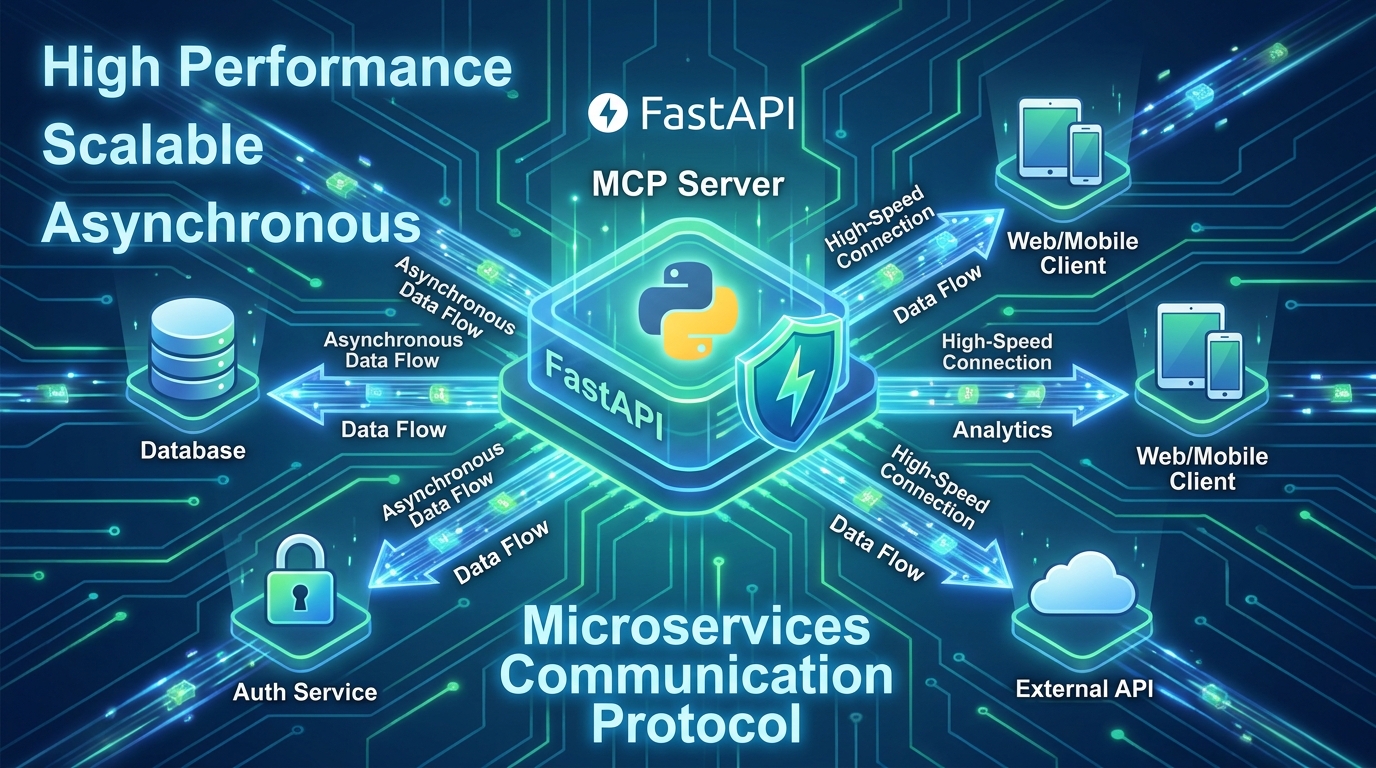
In today's fast-paced digital landscape, building scalable, resilient, and high-performance backend systems is paramount. Microservices architectures have emerged as a dominant paradigm, breaking down monolithic applications into smaller, manageable, and independently deployable services. At the heart of such systems often lies an MCP Server – a Microservices Communication Protocol server – acting as a crucial hub for inter-service communication.
This guide dives deep into building a robust MCP server using Python and FastAPI. FastAPI, a modern, fast (high-performance) web framework for building APIs with Python 3.7+, offers numerous advantages for this task:
async/await capabilities make it perfect for handling concurrent I/O operations common in microservices.By the end of this comprehensive guide, you will have a clear understanding of MCP servers, practical skills to implement one with FastAPI, and knowledge of best practices for testing, deployment, and optimization.
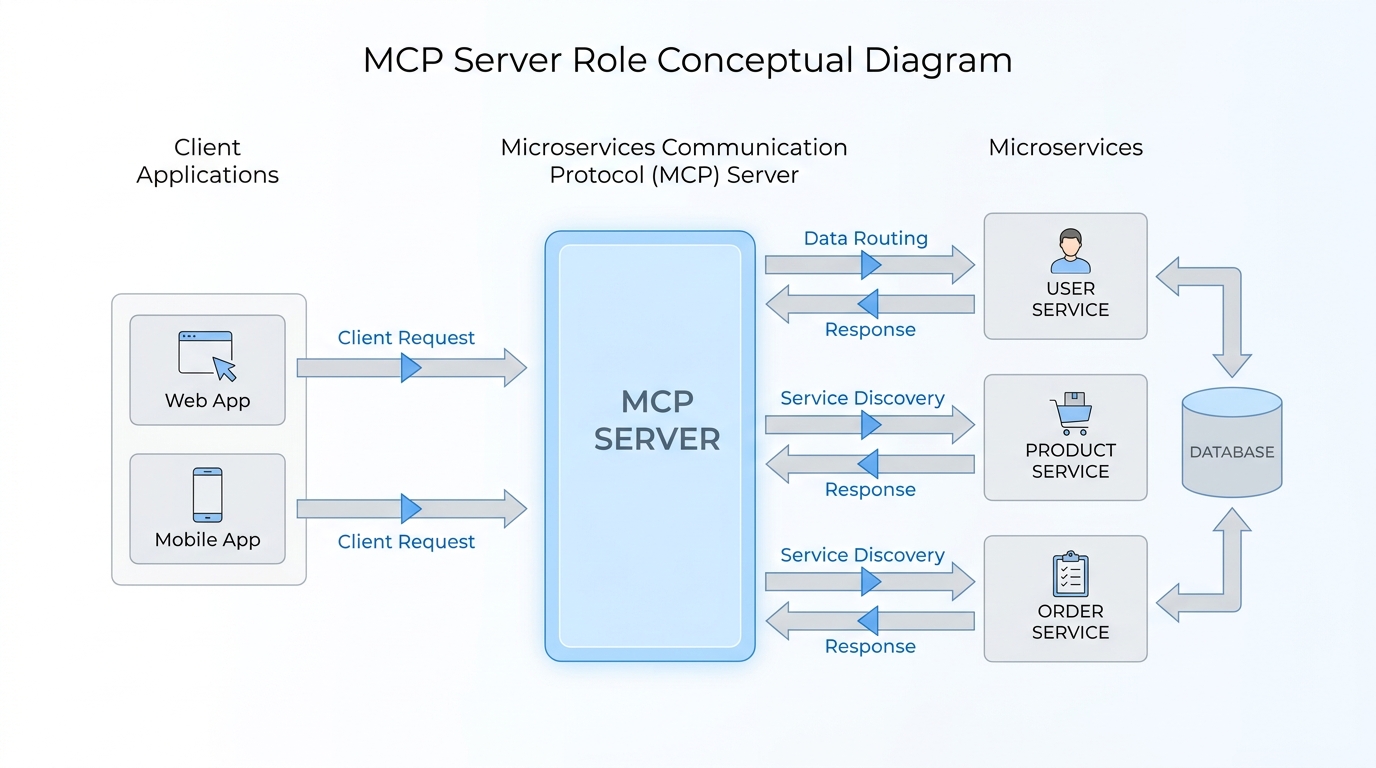
An MCP server, or Microservices Communication Protocol server, serves as a specialized gateway or a central communication layer within a microservices ecosystem. Its primary role is to facilitate efficient and reliable interaction between various independent microservices and external client applications. Think of it as the traffic controller for your microservices, ensuring messages get to the right place quickly and securely.
Key concepts and functionalities of an MCP server often include:
FastAPI's architecture aligns perfectly with these requirements. Its asynchronous nature allows it to handle a large number of concurrent connections without blocking, which is crucial for an MCP server that acts as a central communication point. Pydantic models ensure that all incoming and outgoing data adheres to predefined schemas, preventing common data-related bugs. Moreover, the automatic OpenAPI documentation simplifies integration for both internal and external clients, making your MCP server easy to understand and consume.
Before we dive into coding, let's set up a clean and robust development environment. This ensures that your project dependencies are isolated and managed effectively.
Follow these steps:
pyenv or conda.standard extra for Uvicorn, which includes websockets and python-dotenv for convenience.# Create a new directory for your project
mkdir mcp_server
cd mcp_server
# Create a virtual environment
python3 -m venv .venv
# Activate the virtual environment
# On macOS/Linux:
source .venv/bin/activate
# On Windows (Command Prompt):
# .venv\Scripts\activate.bat
# On Windows (PowerShell):
# .venv\Scripts\Activate.ps1
# Install FastAPI and Uvicorn
pip install fastapi "uvicorn[standard]"You're now ready to start building your MCP server! The activated virtual environment ensures that your project's dependencies are neatly contained.
With our environment ready, let's move to the exciting part: building the MCP server itself. We'll start by defining the data structures that our microservices will communicate with, then implement the core API endpoints to handle these communications. This section will lay the foundation for a functional and robust server.
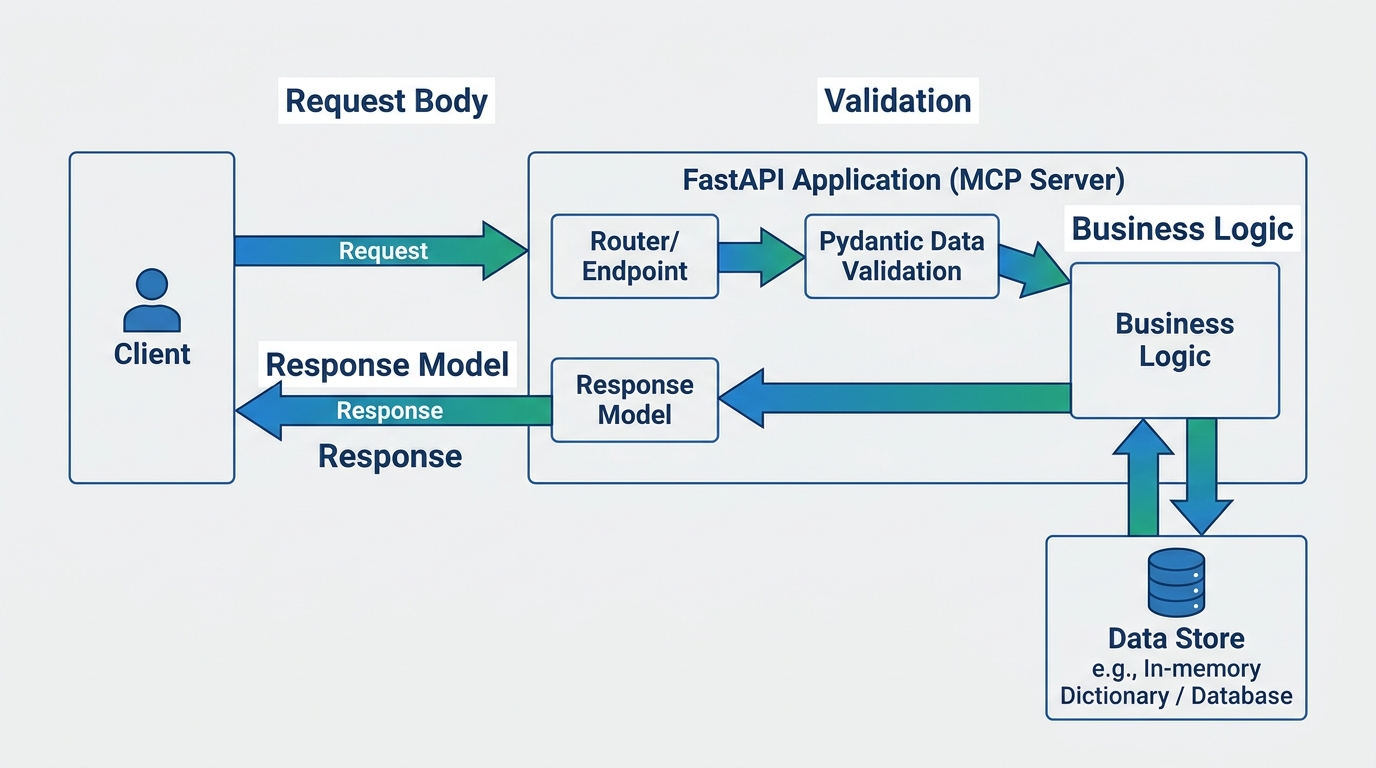
Data models are crucial for defining the structure of messages exchanged between services. FastAPI leverages Pydantic for this, allowing you to define clear, type-hinted data schemas that automatically provide validation and serialization. Let's create a simple Message model that our MCP server will handle.
First, create a file named main.py in your project directory:
# main.py

from fastapi import FastAPI, HTTPException
from pydantic import BaseModel
from typing import Dict, List

# Initialize FastAPI application
app = FastAPI(title="MCP Server", description="Microservices Communication Protocol Server")

# 1. Define Pydantic Data Models
# This model defines the structure of a message that services will exchange.
class Message(BaseModel):
    id: str
    sender_service: str
    recipient_service: str
    payload: Dict
    timestamp: str # For simplicity, using string. In real-world, use datetime.

# In-memory storage for messages (for demonstration purposes)
messages_db: Dict[str, Message] = {}

# 2. Define Core API Endpoints

@app.get("/messages", response_model=List[Message], summary="Retrieve all messages")
async def get_all_messages():
    """Retrieves a list of all messages currently stored in the MCP server."""
    return list(messages_db.values())

@app.get("/messages/{message_id}", response_model=Message, summary="Retrieve a specific message by ID")
async def get_message(message_id: str):
    """Retrieves a single message using its unique ID."""
    if message_id not in messages_db:
        raise HTTPException(status_code=404, detail="Message not found")
    return messages_db[message_id]

@app.post("/messages", response_model=Message, status_code=201, summary="Send a new message")
async def send_message(message: Message):
    """Sends a new message through the MCP server. The message is stored and can be retrieved by recipient services."""
    if message.id in messages_db:
        raise HTTPException(status_code=400, detail="Message with this ID already exists")
    messages_db[message.id] = message
    return message

@app.put("/messages/{message_id}", response_model=Message, summary="Update an existing message")
async def update_message(message_id: str, updated_message: Message):
    """Updates an existing message identified by its ID. The entire message object is replaced."""
    if message_id not in messages_db:
        raise HTTPException(status_code=404, detail="Message not found")
    if message_id != updated_message.id:
        raise HTTPException(status_code=400, detail="Message ID in path and body do not match")
    messages_db[message_id] = updated_message
    return updated_message

@app.delete("/messages/{message_id}", status_code=204, summary="Delete a message")
async def delete_message(message_id: str):
    """Deletes a message from the MCP server using its ID."""
    if message_id not in messages_db:
        raise HTTPException(status_code=404, detail="Message not found")
    del messages_db[message_id]
    return {"message": "Message deleted successfully"}
To run this basic server, execute the following command in your terminal (make sure your virtual environment is active):
uvicorn main:app --reloadYour MCP server is now running! You can access the interactive API documentation at http://127.0.0.1:8000/docs to test the endpoints. This setup demonstrates how FastAPI handles data validation, request parsing, and response generation with minimal code.
While our in-memory messages_db is great for demonstration, real-world MCP servers need persistent storage. For simplicity, we'll continue with an in-memory dictionary but acknowledge that you'd typically integrate with a database like PostgreSQL, MongoDB, or SQLite using an ORM like SQLAlchemy.
Beyond basic CRUD, real-time communication is often a critical feature for MCP servers, enabling immediate notifications or live updates between services. FastAPI provides excellent support for WebSockets, allowing for persistent, bidirectional communication. Let's add a simple WebSocket endpoint to our server for real-time message notifications.
# main.py (continued)

from fastapi import FastAPI, HTTPException, WebSocket, WebSocketDisconnect
from pydantic import BaseModel
from typing import Dict, List, Set
import json

app = FastAPI(title="MCP Server", description="Microservices Communication Protocol Server")

class Message(BaseModel):
    id: str
    sender_service: str
    recipient_service: str
    payload: Dict
    timestamp: str

messages_db: Dict[str, Message] = {}

# Set to keep track of active WebSocket connections
active_connections: Set[WebSocket] = set()

# Existing GET, POST, PUT, DELETE endpoints for messages go here...
# (Copy-paste the previous endpoints from the 'Designing Data Models' section)

@app.get("/messages", response_model=List[Message], summary="Retrieve all messages")
async def get_all_messages():
    return list(messages_db.values())

@app.get("/messages/{message_id}", response_model=Message, summary="Retrieve a specific message by ID")
async def get_message(message_id: str):
    if message_id not in messages_db:
        raise HTTPException(status_code=404, detail="Message not found")
    return messages_db[message_id]

@app.post("/messages", response_model=Message, status_code=201, summary="Send a new message")
async def send_message(message: Message):
    if message.id in messages_db:
        raise HTTPException(status_code=400, detail="Message with this ID already exists")
    messages_db[message.id] = message

    # Notify all connected WebSocket clients about the new message
    for connection in active_connections:
        await connection.send_text(json.dumps({"type": "new_message", "data": message.dict()}))

    return message

@app.put("/messages/{message_id}", response_model=Message, summary="Update an existing message")
async def update_message(message_id: str, updated_message: Message):
    if message_id not in messages_db:
        raise HTTPException(status_code=404, detail="Message not found")
    if message_id != updated_message.id:
        raise HTTPException(status_code=400, detail="Message ID in path and body do not match")
    messages_db[message_id] = updated_message

    # Notify all connected WebSocket clients about the updated message
    for connection in active_connections:
        await connection.send_text(json.dumps({"type": "updated_message", "data": updated_message.dict()}))

    return updated_message

@app.delete("/messages/{message_id}", status_code=204, summary="Delete a message")
async def delete_message(message_id: str):
    if message_id not in messages_db:
        raise HTTPException(status_code=404, detail="Message not found")
    del messages_db[message_id]

    # Notify all connected WebSocket clients about the deleted message
    for connection in active_connections:
        await connection.send_text(json.dumps({"type": "deleted_message", "data": {"id": message_id}}))

    return {"message": "Message deleted successfully"}

# WebSocket endpoint for real-time updates
@app.websocket("/ws/messages")
async def websocket_endpoint(websocket: WebSocket):
    await websocket.accept()
    active_connections.add(websocket)
    try:
        while True:
            # Keep the connection alive, or handle incoming WebSocket messages if needed
            # For this example, we only send messages from the server.
            await websocket.receive_text()
    except WebSocketDisconnect:
        active_connections.remove(websocket)
        print(f"Client disconnected from WebSocket: {websocket.client}")
    except Exception as e:
        print(f"WebSocket error: {e}")
        active_connections.discard(websocket)
Now, when you send a POST or PUT request to /messages, any client connected to the /ws/messages WebSocket endpoint will receive a real-time notification. This demonstrates how to build a dynamic and responsive MCP server capable of handling both traditional API requests and real-time event streams.
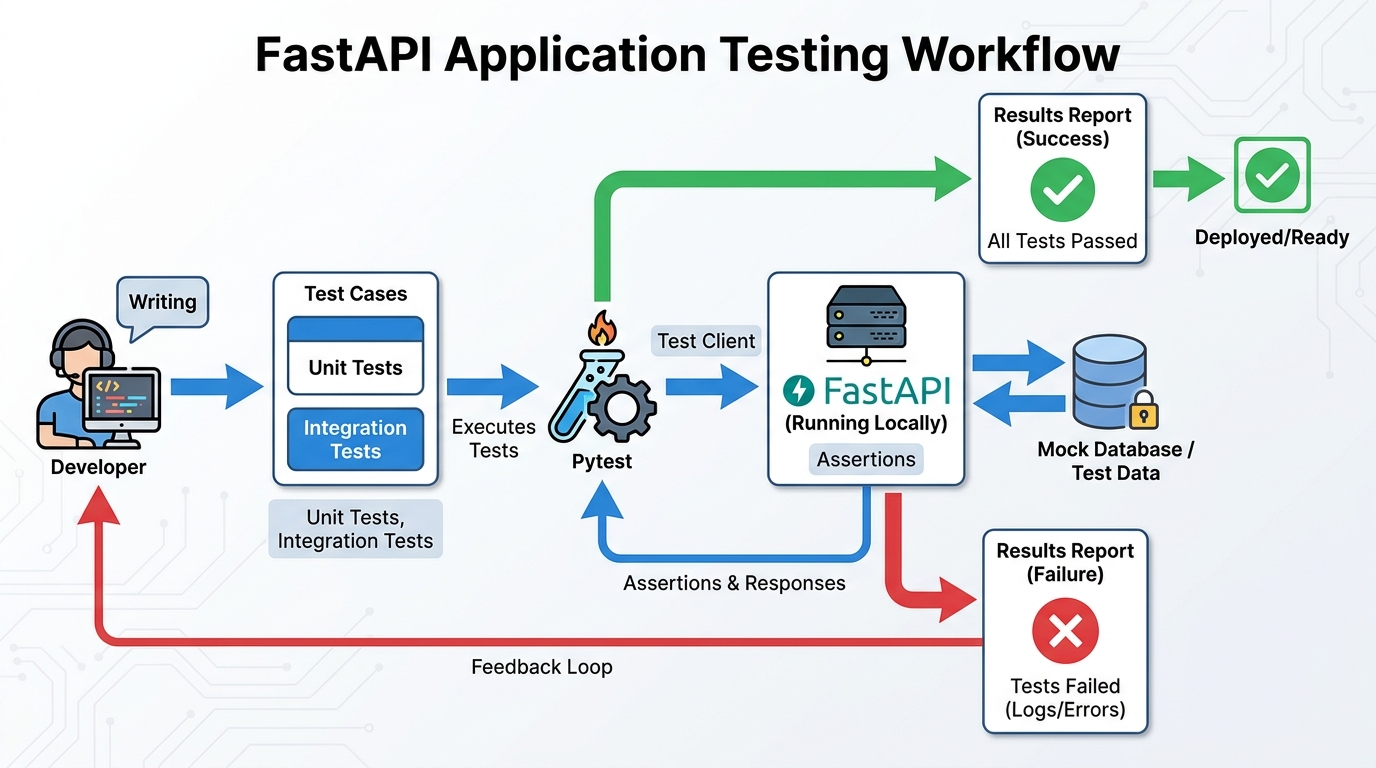
Testing is a non-negotiable part of building reliable software, especially for an MCP server that acts as a critical communication layer. FastAPI makes testing straightforward with its TestClient (which uses httpx internally) and pytest. We'll write unit tests for our endpoints to ensure they behave as expected.
First, install pytest and httpx if you haven't already (though uvicorn[standard] should have installed httpx):
pip install pytest httpxNext, create a file named test_main.py in your project directory:
# test_main.py

from fastapi.testclient import TestClient
from main import app, messages_db, Message # Import app and messages_db from your main.py
import pytest

# Create a TestClient instance for your FastAPI app
client = TestClient(app)

# Use a fixture to clear the database before each test
@pytest.fixture(autouse=True)
def clear_messages_db():
    messages_db.clear()
    yield

# Test the POST /messages endpoint
def test_send_message():
    message_data = {
        "id": "msg1",
        "sender_service": "service_a",
        "recipient_service": "service_b",
        "payload": {"data": "hello"},
        "timestamp": "2023-10-27T10:00:00Z"
    }
    response = client.post("/messages", json=message_data)
    assert response.status_code == 201
    assert response.json() == message_data
    assert messages_db["msg1"].dict() == message_data

# Test sending a message with an existing ID
def test_send_message_existing_id():
    message_data = {
        "id": "msg1",
        "sender_service": "service_a",
        "recipient_service": "service_b",
        "payload": {"data": "hello"},
        "timestamp": "2023-10-27T10:00:00Z"
    }
    client.post("/messages", json=message_data) # First message
    response = client.post("/messages", json=message_data) # Second message with same ID
    assert response.status_code == 400
    assert response.json() == {"detail": "Message with this ID already exists"}

# Test the GET /messages endpoint
def test_get_all_messages():
    message1 = Message(id="msg1", sender_service="s1", recipient_service="s2", payload={}, timestamp="t1")
    message2 = Message(id="msg2", sender_service="s3", recipient_service="s4", payload={}, timestamp="t2")
    messages_db["msg1"] = message1
    messages_db["msg2"] = message2

    response = client.get("/messages")
    assert response.status_code == 200
    assert len(response.json()) == 2
    assert response.json()[0] == message1.dict()
    assert response.json()[1] == message2.dict()

# Test the GET /messages/{message_id} endpoint
def test_get_message_by_id():
    message_data = {
        "id": "msg1",
        "sender_service": "service_a",
        "recipient_service": "service_b",
        "payload": {"data": "hello"},
        "timestamp": "2023-10-27T10:00:00Z"
    }
    client.post("/messages", json=message_data)
    response = client.get("/messages/msg1")
    assert response.status_code == 200
    assert response.json() == message_data

# Test GET for a non-existent message
def test_get_non_existent_message():
    response = client.get("/messages/nonexistent")
    assert response.status_code == 404
    assert response.json() == {"detail": "Message not found"}

# Test the PUT /messages/{message_id} endpoint
def test_update_message():
    message_data = {
        "id": "msg1",
        "sender_service": "s1",
        "recipient_service": "s2",
        "payload": {"data": "original"},
        "timestamp": "t1"
    }
    client.post("/messages", json=message_data)

    updated_data = {
        "id": "msg1",
        "sender_service": "s1_updated",
        "recipient_service": "s2_updated",
        "payload": {"data": "updated"},
        "timestamp": "t_updated"
    }
    response = client.put("/messages/msg1", json=updated_data)
    assert response.status_code == 200
    assert response.json() == updated_data
    assert messages_db["msg1"].dict() == updated_data

# Test the DELETE /messages/{message_id} endpoint
def test_delete_message():
    message_data = {
        "id": "msg1",
        "sender_service": "s1",
        "recipient_service": "s2",
        "payload": {"data": "delete me"},
        "timestamp": "t1"
    }
    client.post("/messages", json=message_data)
    response = client.delete("/messages/msg1")
    assert response.status_code == 204
    assert "msg1" not in messages_db
Run your tests from the terminal:
pytestThis setup provides a solid foundation for ensuring your MCP server's endpoints are functioning correctly and handling various scenarios as expected. Remember to expand your test suite as your server grows in complexity.
Once your FastAPI MCP server is developed and thoroughly tested, the next crucial step is deploying it to a production environment. FastAPI applications are typically deployed using an ASGI server like Uvicorn, often behind a reverse proxy and within containers for scalability and reliability.
Here are common deployment strategies:
A production-ready MCP server must be both performant and secure. Here's how to achieve that:
Performance Optimization:
await to prevent blocking the event loop.BackgroundTasks or a dedicated task queue like Celery to offload work.Security Considerations:
While FastAPI is an excellent choice for building MCP servers, it's helpful to understand how it stacks up against other popular Python web frameworks like Flask and Django. Each framework has its strengths, and the best choice often depends on specific project requirements.
| Feature | FastAPI | Flask | Django |
|---|---|---|---|
| Performance | Very High (async, Starlette) | Medium (synchronous by default) | Medium (synchronous by default) |
| Async Support | Native async/await |
Requires extensions (e.g., Flask-Async) | Limited native support, async views in newer versions |
| Data Validation | Built-in (Pydantic) | Requires external libraries (e.g., Marshmallow) | Built-in (Django Forms/REST Framework serializers) |
| API Documentation | Automatic (OpenAPI/Swagger UI) | Requires external libraries | Requires external libraries (e.g., Django REST Swagger) |
| Learning Curve | Moderate (Python knowledge, async concepts) | Low (minimalist) | High (opinionated, many components) |
| ORM | Bring your own (SQLAlchemy, Tortoise ORM) | Bring your own | Built-in (Django ORM) |
| Suitability for Microservices | Excellent (lightweight, high performance, async) | Good (lightweight, flexible) | Less ideal (monolithic tendencies, heavier) |
From the comparison, it's clear that FastAPI shines for building high-performance, API-centric microservices. Its native asynchronous capabilities and built-in data validation with Pydantic significantly reduce development time and improve code quality, making it a compelling choice for an MCP server. Flask offers more flexibility but requires more manual setup for features like data validation and async. Django, while powerful for full-stack web applications with its batteries-included approach, can be overkill and less performant for purely API-driven microservices due to its synchronous nature and larger footprint.
You've embarked on a comprehensive journey, from understanding the core concepts of an MCP server to implementing, testing, and preparing it for production using Python and FastAPI. We've covered the essential building blocks:
FastAPI's modern features, including its speed, asynchronous support, and automatic documentation, make it an unparalleled choice for developing high-performance MCP servers that are both scalable and maintainable. The principles and code examples provided in this guide equip you with the knowledge to build robust communication layers for your microservices architectures.
Now, take these concepts and apply them to your projects. Experiment with different persistence layers, integrate with message brokers like Kafka or RabbitMQ for more complex event-driven patterns, and explore advanced authentication mechanisms. The future of server development is dynamic, and with FastAPI, you're well-positioned to build cutting-edge solutions.
Building an MCP server often presents challenges such as managing service discovery, ensuring data consistency across multiple microservices, and handling distributed transactions. Robust error handling, comprehensive logging, and continuous monitoring are also crucial for maintaining system health. Furthermore, designing for scalability and implementing strong security measures are ongoing considerations throughout the development lifecycle.
Absolutely. While FastAPI is renowned for its asynchronous capabilities, making it ideal for high-concurrency MCP servers, it can seamlessly handle synchronous code as well. However, to fully leverage the performance benefits and non-blocking I/O that are often critical in microservices communication, it's highly recommended to embrace FastAPI's async features whenever possible for optimal efficiency and responsiveness.
Service versioning in an MCP server can be effectively managed through several strategies. Common approaches include URL path versioning (e.g., `/v1/resource`), header versioning (e.g., `X-API-Version: 1`), or content negotiation using the `Accept` header. FastAPI's flexible routing and request parsing mechanisms provide robust tools to implement these versioning strategies, ensuring backward compatibility and enabling smooth, controlled transitions between different service iterations without disrupting existing clients.
A message broker, such as RabbitMQ or Apache Kafka, plays a pivotal role in enhancing an MCP server's capabilities, particularly in event-driven architectures. It facilitates asynchronous communication between microservices, decoupling them from direct dependencies. This improves system resilience, scalability, and fault tolerance by allowing services to communicate indirectly through messages, ensuring that failures in one service do not immediately impact others and enabling more robust, distributed systems.
Build a powerful AI agent with Python and MCP, covering server setup, tool creation, agent connection, and dynamic tool calling for intelligent interactions
Unlock Random Forest mastery with our Python guide. Explore core concepts, implementation, hyperparameters, and real-world applications for robust ML
Master Decision Trees in ML, learning their mechanics, splitting criteria, Python implementation, and overfitting prevention for classification and regression