>_Programming Partner
Loading technical insights...
Loading technical insights...
Software Developer
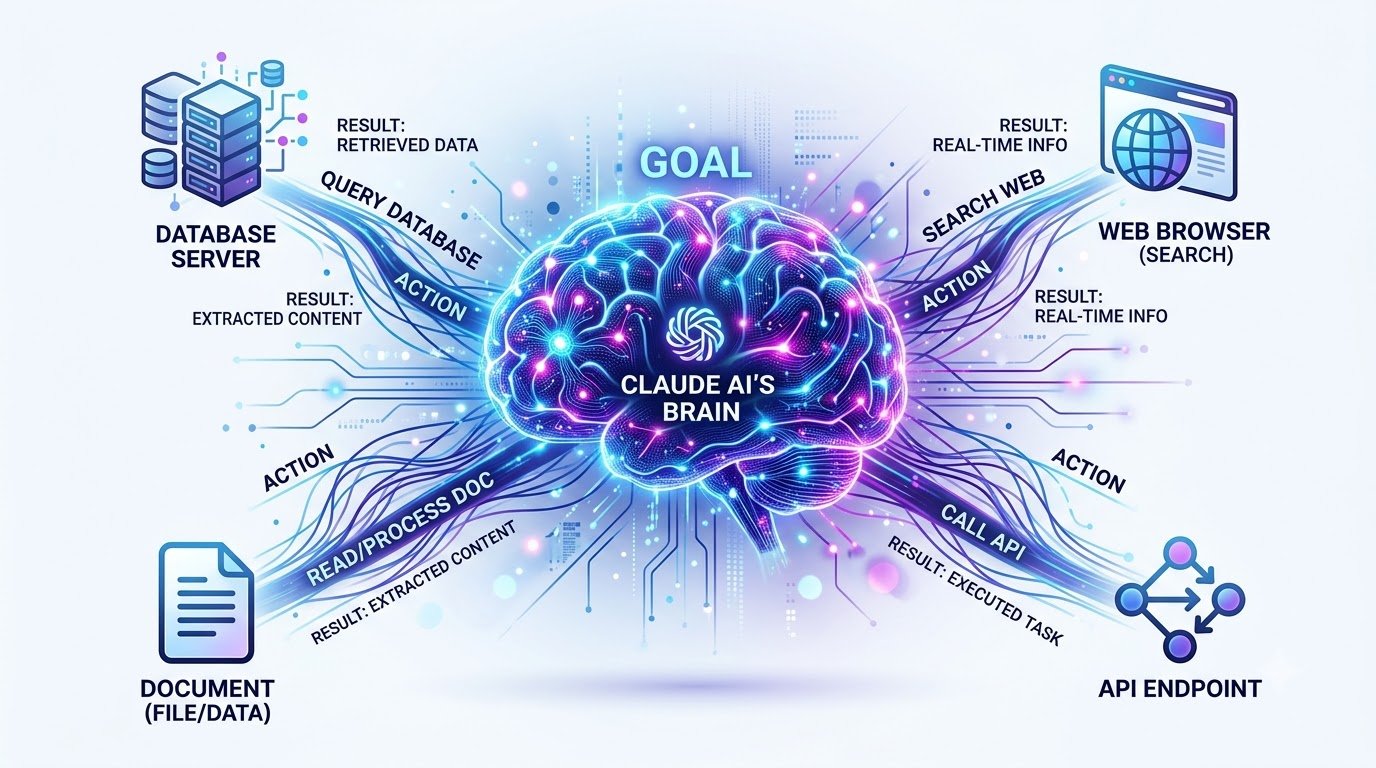
Claude AI agents are sophisticated systems that leverage Anthropic's Claude models to go beyond simple question-answering. These agents can reason about complex tasks, choose appropriate actions, and utilize external tools to achieve multi-step objectives autonomously. They represent a significant leap from traditional AI interactions.
The key difference lies in their ability to pursue a goal that might require several iterative actions, rather than just providing a single response. Instead of merely answering "What is the weather?", an agent could be tasked with "Plan a weekend trip based on the weather forecast and my calendar availability." This involves multiple steps and tool uses.
Throughout this article, we will explore how to design, build, and deploy these intelligent systems. You will learn the core mechanics of autonomous workflows, how to integrate powerful tools, and best practices for creating reliable and safe Claude AI agents.
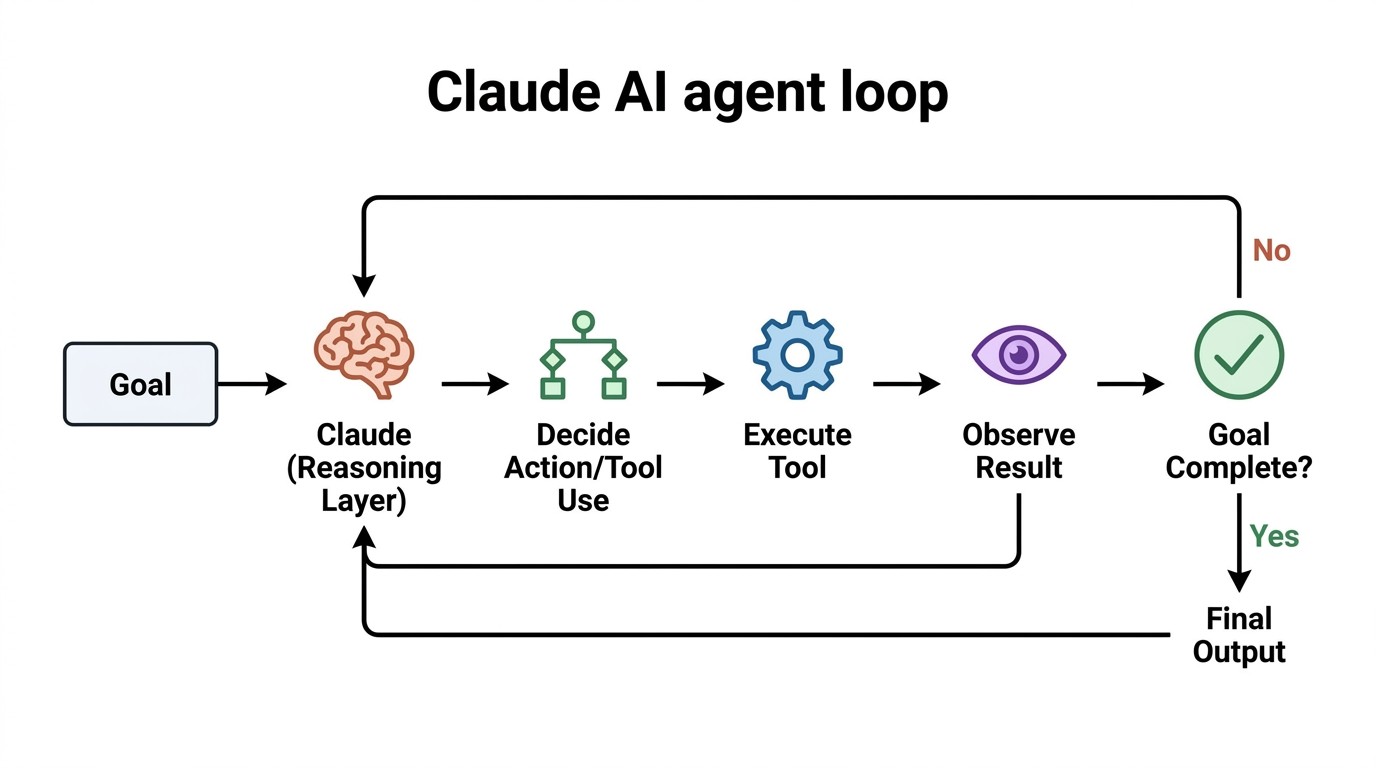
At its heart, a Claude AI agent operates through a continuous, autonomous loop. This loop allows the agent to break down complex goals into manageable steps and adapt its strategy based on real-time feedback. It's a cycle of understanding, acting, and observing.
The basic agent loop follows a clear sequence: first, the agent receives a goal. Then, it understands the task and decides the next best action to take. This often involves using an external tool, observing the result of that action, and then continuing the loop until the initial goal is fully completed.
Claude serves as the reasoning layer, interpreting information and making decisions, while external tools provide the means to interact with the outside world. For instance, an agent tasked with researching a topic might use a web search tool, analyze the results, draft a summary, and then use a file system tool to save the report automatically.
Traditional automation systems typically follow a rigid, predefined sequence of steps, like A then B then C. These workflows are excellent for predictable, repetitive tasks where the path to completion is always the same. Any deviation or unexpected input can cause these systems to fail or require manual intervention.
In contrast, a Claude AI agent can dynamically decide which steps are necessary based on the current situation and tool results. If a tool call returns an error, the agent can attempt a different approach or rephrase its query. This adaptability allows agents to handle variability and uncertainty much more effectively.
While deterministic workflows are still superior for highly predictable tasks, AI agents excel where reasoning and flexible decision-making are paramount. They are ideal for scenarios where the exact steps to achieve a goal are not known beforehand or may change during execution. This makes them powerful for complex problem-solving.
| Feature | Traditional Automation | Claude AI Agent |
|---|---|---|
| Flexibility | Rigid, predefined steps | Dynamic, adaptive decision-making |
| Decision-Making | Rule-based, deterministic | LLM-powered reasoning, contextual |
| Error Handling | Pre-programmed exceptions, often fails | Adaptive, can re-evaluate and retry |
| Use Cases | Repetitive, predictable tasks (e.g., data entry) | Complex, variable tasks (e.g., research, customer support) |
| Complexity | Easier to debug, but limited scope | More complex to design, but highly capable |
To understand how Claude AI agents function, it's helpful to break them down into their core components. Each part plays a vital role in enabling the agent's autonomous capabilities. These components work in concert to process information, make decisions, and interact with the environment.
The essential components include the Claude model itself, system instructions that define its role, external tools for interaction, memory and context management, various data sources, and the overarching execution loop. Together, they form a robust and intelligent system capable of complex tasks.
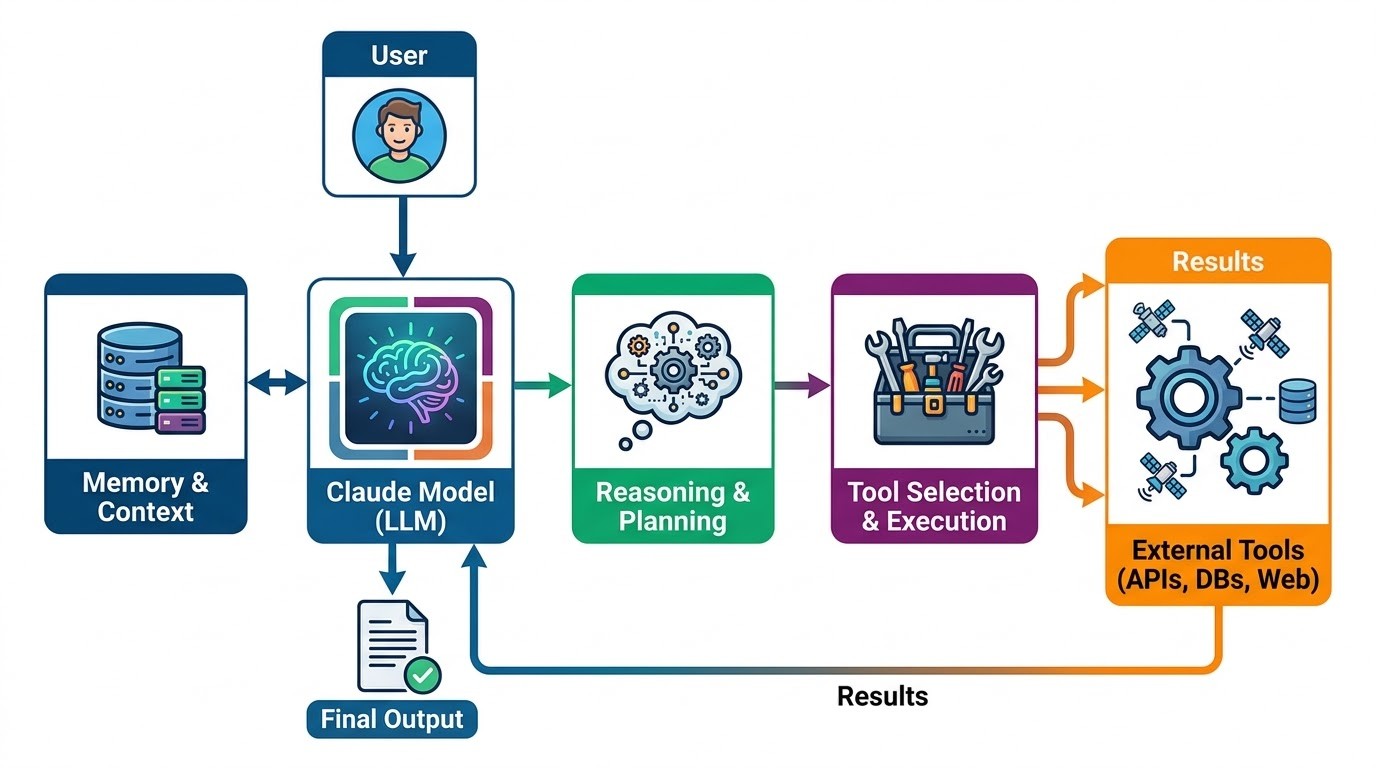
The Claude model provides the core intelligence, performing natural language understanding and generation. System instructions guide the agent's behavior and persona, setting its boundaries and objectives. Tools are external functions or APIs that the agent can call to perform specific actions.
Memory and context allow the agent to retain information across multiple turns and steps, crucial for multi-step tasks. Data sources provide the raw information the agent needs to operate, while the execution loop orchestrates the entire process, ensuring the agent continuously works towards its goal.
An AI agent's true power emerges when Claude can call external tools, rather than simply generating text. These tools extend the agent's capabilities beyond its inherent language model, allowing it to interact with the real world. Tools enable agents to perform actions like fetching real-time data, sending emails, or updating databases.
Common examples of tools include APIs for web services, database connectors, web search engines, file system operations, and integrations with CRM or calendar applications. Claude determines which available tool is appropriate for a given step, supplies the necessary information, and then processes the tool's output to decide its next move.
This dynamic interaction between Claude's reasoning and external tools creates a powerful feedback loop. The agent can execute actions, observe their effects, and then adjust its plan accordingly, leading to highly effective and adaptive workflows. Here's a basic Python example of defining a tool.
import anthropic
import json

# Define a simple tool function that simulates a web search
def search_web(query: str) -> str:
    """Searches the web for the given query and returns a summary of results."""
    # In a real application, this would call a search API (e.g., Google Search, Bing)
    # For this example, we'll return a mock result.
    if "latest AI news" in query.lower():
        return "Mock search result: AI advancements in LLMs continue, with new models focusing on multimodal capabilities and improved reasoning. Major conferences announced new research."
    elif "weather in london" in query.lower():
        return "Mock search result: The weather in London tomorrow is expected to be partly cloudy with a high of 18°C and a low of 10°C."
    else:
        return f"Mock search result for '{query': No specific information found, but general web results indicate various topics related to your query."

# Define the tool schema for Claude
search_tool_schema = {
    "name": "search_web",
    "description": "Searches the web for information based on a user query.",
    "input_schema": {
        "type": "object",
        "properties": {
            "query": {
                "type": "string",
                "description": "The search query to use for the web search."

        ,
        "required": ["query"]


# Example of how Claude might call this tool (conceptual)
# client = anthropic.Anthropic()
# response = client.beta.tools.messages.create(
#     model="claude-3-opus-20240229",
#     max_tokens=1024,
#     messages=[
#         {"role": "user", "content": "What is the latest AI news?"
#     ],
#     tools=[search_tool_schema]
# )
# print(response.content)

# To demonstrate tool execution based on a mock response
# if response.content[0].type == "tool_use":
#     toolₙame = response.content[0].name
#     toolᵢnput = response.content[0].input
#     if toolₙame == "search_web":
#         result = search_web(toolᵢnput["query"])
# print(f"Tool '{toolₙame' executed with query '{toolᵢnput["query"]'. Result: {result")The Model Context Protocol (MCP) offers a standardized and efficient way for AI applications to connect with tools and external data sources. It provides a structured interface, allowing agents to discover and interact with capabilities exposed by various services. This protocol simplifies the integration process significantly.
MCP servers can expose a wide array of functionalities, such as database operations, file system access, integrations with business systems, or custom API calls. By using MCP, developers can create a unified ecosystem where agents can seamlessly access and utilize diverse resources. This abstraction layer enhances modularity and reusability.
For a deeper dive into implementing MCP with Python and detailed technical explanations, please refer to our dedicated article on "Mastering the Model Context Protocol with Python." This resource provides comprehensive guidance on setting up and utilizing MCP servers for advanced agent functionalities.
Before diving into implementation, it's crucial to design your autonomous workflow conceptually. Start by clearly defining the agent's objective, such as "Research the impact of quantum computing on cryptography." A well-defined goal provides direction and measurable success criteria for the agent.
Next, identify the information the agent needs, the tools it can access, and the decisions it's allowed to make. Establish clear boundaries and conditions that determine when the task is finished. Giving an agent unlimited freedom does not automatically make it more capable; precise constraints lead to more reliable outcomes.
Let's walk through building a Claude autonomous research agent. This agent will receive a research topic, use a search tool to gather information, synthesize findings, and generate a structured report. This example connects many of the concepts we've discussed so far.
import anthropic
import json

# Assume search_web and search_tool_schema are defined as in the previous block
# For simplicity, we'll redefine them here for a self-contained example.

def search_web(query: str) -> str:
    """Simulates a web search for the given query."""
    print(f"DEBUG: Executing search_web with query: {query")
    if "quantum computing cryptography" in query.lower():
        return "Quantum computing threatens current cryptographic methods like RSA and ECC. Post-quantum cryptography (PQC) is being developed to resist quantum attacks. NIST is standardizing new PQC algorithms."
    elif "post-quantum cryptography" in query.lower():
        return "PQC focuses on algorithms resistant to quantum computers. Examples include lattice-based, code-based, and multivariate polynomial cryptography. Standardization efforts are ongoing globally."
    else:
        return f"No specific research found for '{query'."

search_tool_schema = {
    "name": "search_web",
    "description": "Searches the web for information based on a user query.",
    "input_schema": {
        "type": "object",
        "properties": {
            "query": {
                "type": "string",
                "description": "The search query to use for the web search."

        ,
        "required": ["query"]


# Initialize the Claude client
client = anthropic.Anthropic()

def run_research_agent(research_topic: str, maxᵢterations: int = 5) -> str:
    """Runs an autonomous research agent using Claude and a search tool."""
    messages = [
        {
            "role": "user",
            "content": f"Please research the following topic and provide a comprehensive report: {research_topic"

    ]

    # System prompt to guide Claude's behavior as a research agent
    system_prompt = (
        "You are an expert research assistant. Your goal is to thoroughly research the given topic using the available tools, "
        "synthesize the information, and then generate a detailed, well-structured report. "
        "Use the 'search_web' tool whenever you need to find information. "
        "Once you have sufficient information and have generated the report, use the 'final_report' tool to output the result. "
        "Do not stop until a comprehensive report is ready. If you encounter an error, try a different search query or approach."
    )

    # Define a tool for the final report output
    final_report_tool_schema = {
        "name": "final_report",
        "description": "Outputs the final comprehensive research report.",
        "input_schema": {
            "type": "object",
            "properties": {
                "report_content": {
                    "type": "string",
                    "description": "The full content of the research report."

            ,
            "required": ["report_content"]


    available_tools = [search_tool_schema, final_report_tool_schema]
    report_generated = False
    currentᵢteration = 0

    while not report_generated and currentᵢteration < maxᵢterations:
        currentᵢteration += 1
        print(f"\n--- Agent Iteration {currentᵢteration ---")

        # Call Claude with the current messages and available tools
        response = client.beta.tools.messages.create(
            model="claude-3-opus-20240229",
            max_tokens=2048, # Increased max_tokens for potentially longer responses/tool calls
            messages=messages,
            tools=available_tools,
            system=system_prompt
        )

        # Add Claude's response to the message history
        messages.append({"role": response.role, "content": response.content)
        print(f"Claude's response type: {response.content[0].type")

        # Process tool calls or final output
        for content_block in response.content:
            if content_block.type == "tool_use":
                toolₙame = content_block.name
                toolᵢnput = content_block.input
                print(f"Agent requested to use tool: {toolₙame with input: {toolᵢnput")

                if toolₙame == "search_web":
                    tool_result = search_web(toolᵢnput["query"])
                    # Add tool result to message history for Claude to process
                    messages.append({
                        "role": "user",
                        "content": [
                            {
                                "type": "tool_result",
                                "tool_useᵢd": content_block.id,
                                "content": tool_result

                        ]
                    )
                    print(f"Tool result added to context.")
                elif toolₙame == "final_report":
                    report_content = toolᵢnput["report_content"]
                    print("Agent completed research and generated final report.")
                    report_generated = True
                    return report_content
                else:
                    # Handle unknown tool or error
                    error_message = f"Unknown tool: {toolₙame"
                    messages.append({
                        "role": "user",
                        "content": [
                            {
                                "type": "tool_result",
                                "tool_useᵢd": content_block.id,
                                "content": error_message

                        ]
                    )
                    print(f"Error: {error_message")
            elif content_block.type == "text":
                print(f"Claude's text output: {content_block.text")
                # If Claude just outputs text, it might be an intermediate thought or a direct answer without tool use.
                # The agent loop will continue until a tool_use for final_report is made.

    if not report_generated:
        return "Agent failed to generate a comprehensive report within the maximum iterations."
    return ""

# Example usage:
# research_topic = "The impact of quantum computing on cryptography and the future of secure communication."
# final_report = run_research_agent(research_topic)
# print("\n--- FINAL REPORT ---")
# print(final_report)Autonomous agents often need to maintain information across multiple steps to complete longer, more complex workflows. This involves managing conversation context, persistent information, intermediate results, and the overall task state. An agent cannot simply retain unlimited information within its prompt due to token limits and efficiency concerns.
Developers must strategically store important results externally and retrieve only the most relevant information when needed. This might involve using a database to save previous tool outputs or a vector store to semantically search for pertinent past interactions. Effective context management is crucial for an agent's coherence and performance over time.
For long-running agents, this also means implementing sophisticated memory systems that can summarize or filter historical data. This ensures that Claude always has access to the necessary context without overwhelming its input window, allowing it to make informed decisions throughout the entire workflow.
Autonomous agents, by their nature, require robust restrictions, validation, and error handling before being trusted with real-world actions. Without proper safeguards, issues like incorrect tool calls, hallucinated information, or repeated agent loops can lead to unintended consequences. API failures and excessive token usage are also common concerns.
Practical safeguards include defining strict tool permissions, setting maximum iteration limits for agent loops, and enforcing structured outputs. Implementing human approval for sensitive actions, comprehensive logging, and verification steps before executing high-impact operations are also critical. These measures prevent agents from going rogue or causing harm.
Developers should also build in mechanisms to detect and recover from errors gracefully. This might involve retry logic for failed tool calls or fallback strategies when an agent gets stuck. A well-designed agent prioritizes safety and reliability alongside its autonomous capabilities.
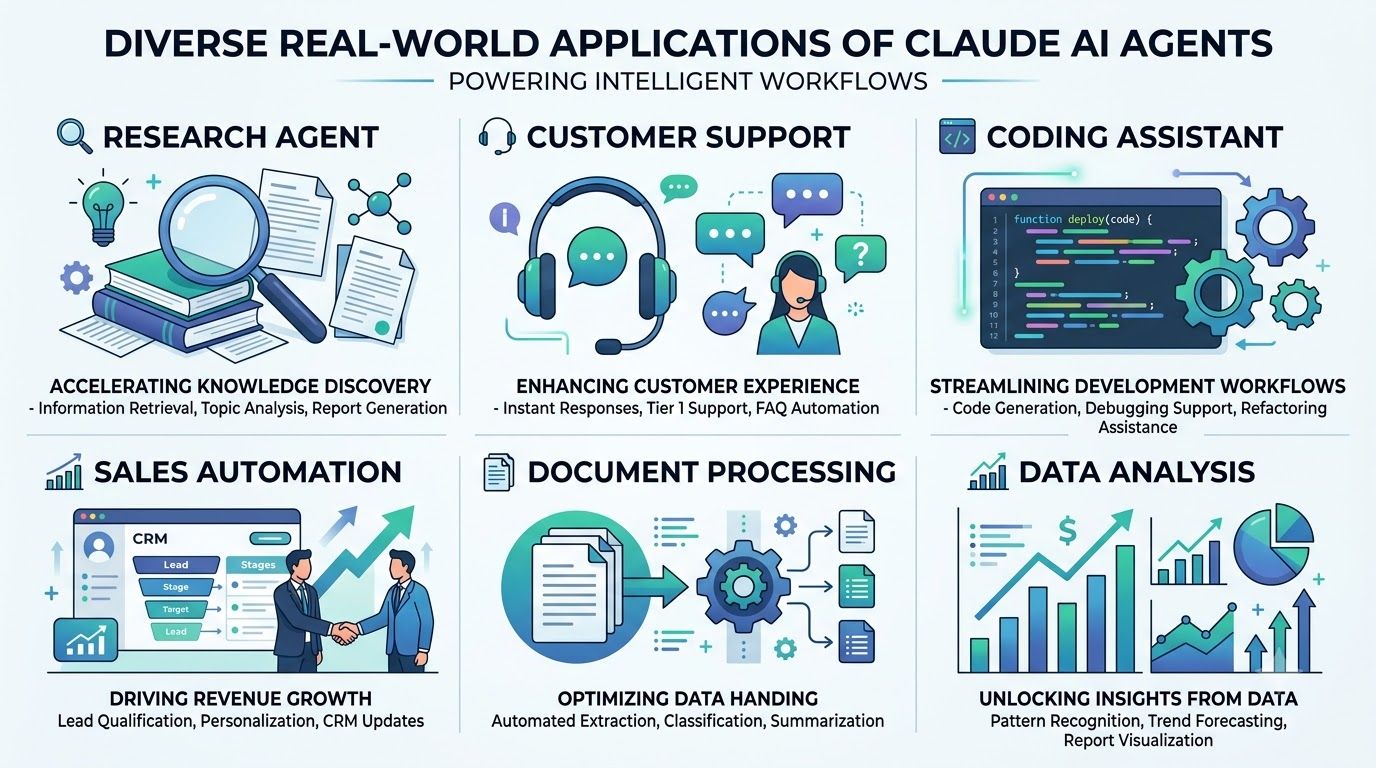
Autonomous Claude workflows offer immense practical value across various industries and use cases. They move beyond simple chatbots to provide intelligent automation that can significantly enhance productivity and decision-making. These agents combine Claude's reasoning with specific tools and business data to solve complex problems.
Consider a research agent that autonomously gathers, synthesizes, and reports on market trends. A customer support agent can diagnose issues, access knowledge bases, and even initiate refunds through integrated tools. Coding agents can generate code, debug, and interact with version control systems, streamlining development.
Other applications include sales assistants that qualify leads and personalize outreach, document-processing agents that extract and categorize information, and data-analysis agents that generate insights from raw data. Email automation and internal business workflow agents can also handle complex, multi-step tasks, freeing up human resources for more strategic work.
Claude agents represent a powerful evolution in automation, combining advanced reasoning with external tools and iterative decision-making. They move far beyond the capabilities of traditional chatbots, enabling systems that can truly understand goals and execute multi-step plans autonomously. This paradigm shift unlocks new possibilities for intelligent workflows.
The most effective autonomous systems are not those given complete, unchecked freedom. Instead, they are meticulously designed with clear goals, appropriate tools, controlled permissions, and robust feedback loops. This structured approach ensures reliability, safety, and optimal performance in real-world scenarios.
As technologies like tool use and the Model Context Protocol (MCP) continue to mature, building increasingly capable and sophisticated AI workflows becomes more accessible for developers. Claude AI agents are paving the way for a future where intelligent automation is not just a concept, but a practical reality across all domains.
Claude AI agents offer dynamic decision-making and adaptability, allowing them to handle unforeseen situations and complex, non-linear tasks. Unlike rigid scripts, agents can interpret context, learn from tool outputs, and adjust their approach, leading to more robust and intelligent automation solutions. This flexibility is crucial for tasks requiring nuanced understanding and problem-solving.
Ensuring data security and privacy involves several best practices. Developers should implement strict access controls for tools, use encrypted connections for data transfer, and sanitize inputs and outputs to prevent injection attacks. Additionally, agents should only be granted the minimum necessary permissions to perform their tasks, adhering to the principle of least privilege. Regular security audits and compliance checks are also vital.
For long-running agents, advanced context management involves externalizing memory beyond the LLM's prompt window. Techniques include using vector databases for semantic search and retrieval of relevant past interactions, summarizing historical conversations to fit within context limits, and implementing hierarchical memory systems that store both short-term and long-term information. This allows agents to maintain coherence and recall pertinent details over extended periods.
Yes, Claude AI agents can be integrated with a wide range of enterprise and legacy systems. This is primarily achieved through the use of custom tools that wrap existing APIs, database connectors, or even robotic process automation (RPA) solutions. The Model Context Protocol (MCP) further simplifies this by providing a standardized interface, allowing agents to interact seamlessly with diverse internal business applications and data sources.
Discover how to earn $1000 monthly leveraging Claude Co-work. This guide shows normal people how to start a profitable content creation business step-by-step
Find the top AI transcription APIs for Indian languages like Hindi, Gujarati, and Tamil. We compare accuracy, speed, features, and pricing to guide your choice
Discover OpenAI's GPT-6 Astra. Learn how this AI outperforms Claude Fable and Meta AI in performance, features, and real-world applications with comparisons