>_Programming Partner
Loading technical insights...
Loading technical insights...
Software Developer
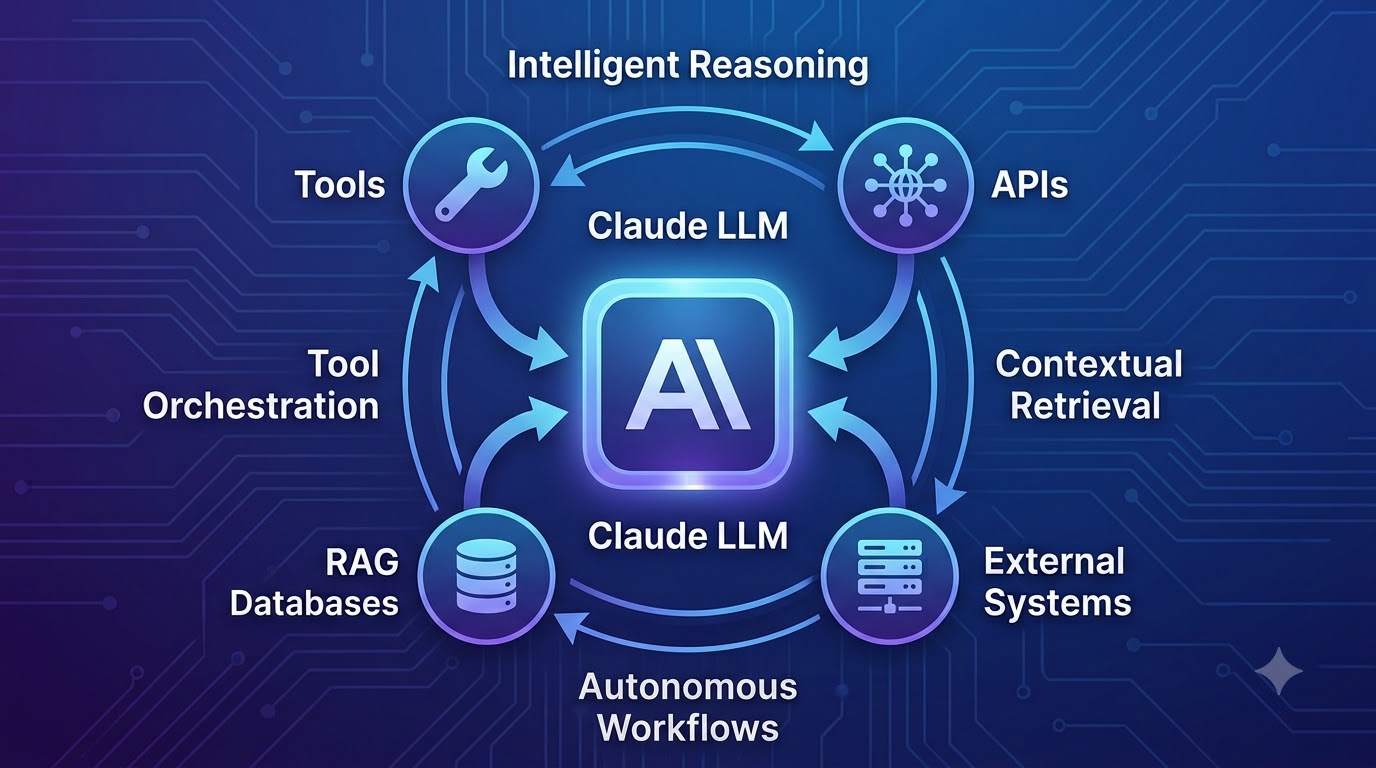
The landscape of artificial intelligence is rapidly evolving beyond simple chatbots that respond to direct queries. We are now entering an era of sophisticated AI agents capable of complex reasoning, autonomous tool use, and intelligent information retrieval.
These agents can complete multi-step tasks, adapt to new information, and interact with external systems, fundamentally changing how we approach automation and problem-solving. Anthropic's Claude, with its advanced reasoning and extensive context window, stands out as a powerful foundation for building these intelligent, autonomous workflows.
The demand for such capable agents is soaring across various industries, from enhancing customer support to automating complex business processes. This article will guide you through building these next-generation AI agents using Claude.
An AI agent is more than just a large language model (LLM) responding to prompts; it's a system designed to perceive its environment, make decisions, and take actions to achieve specific goals. Unlike basic LLM interactions, agents possess a degree of autonomy and can engage in iterative processes.
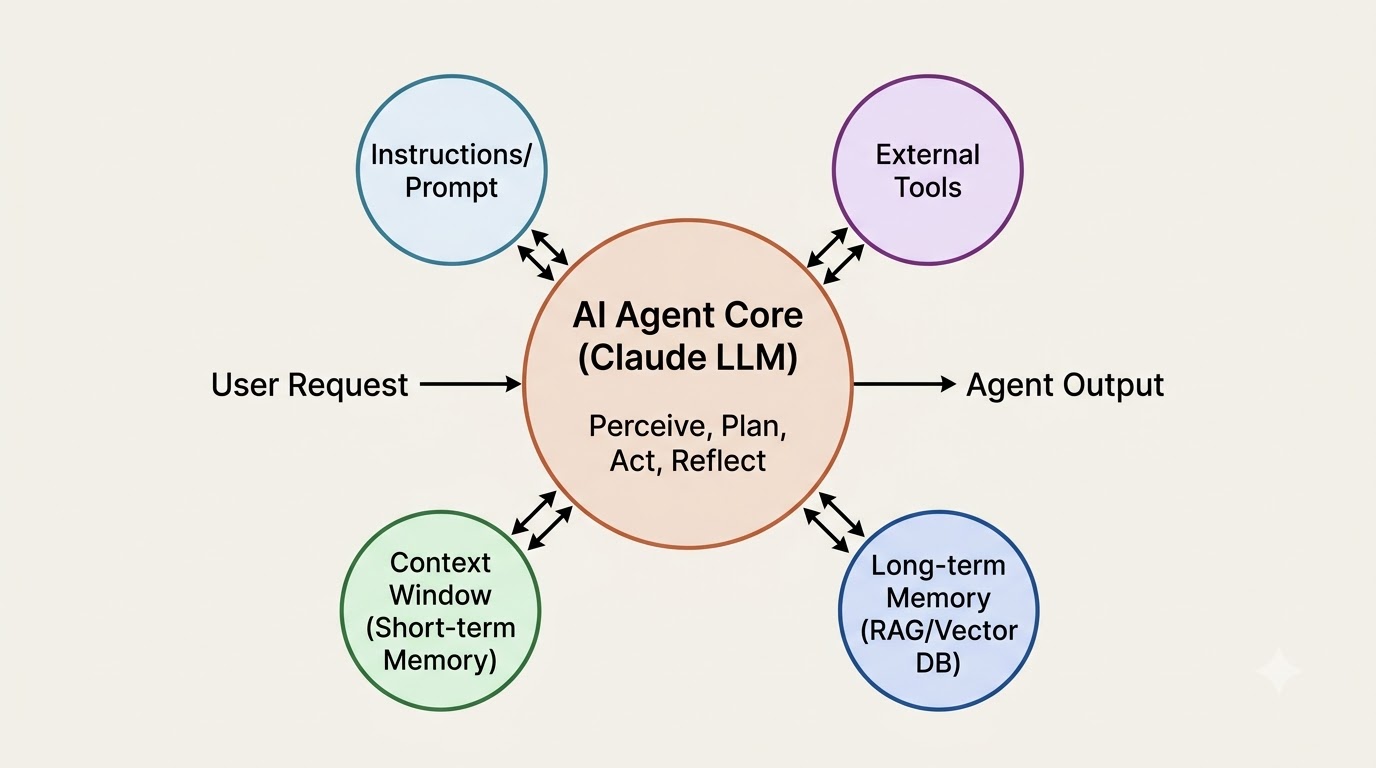
Key components of an AI agent include the core Large Language Model (LLM) for reasoning, a set of instructions or prompts guiding its behavior, and access to external tools. It also maintains a context window for short-term memory and often integrates with long-term memory solutions.
The agent operates through an execution loop: it plans its next steps, acts by using tools or generating text, observes the results, and then reflects to refine its approach. For example, an agent might receive a request to find the best flight, search multiple airline APIs, compare prices, and then present the optimal choice.
Anthropic's Claude models offer distinct advantages that make them an excellent choice for developing sophisticated AI agents. Its strong reasoning abilities allow agents to understand complex instructions, break down tasks, and make logical decisions.
Claude excels at advanced tool-use capabilities, interpreting tool definitions and intelligently deciding when and how to invoke external functions. This enables agents to interact seamlessly with APIs, databases, and other systems.
Furthermore, Claude's extensive long-context processing allows agents to maintain a rich understanding of ongoing conversations and complex data. This is crucial for multi-turn interactions and tasks requiring a deep grasp of historical context.
Its proficiency in following complex, multi-step instructions ensures that agents can execute intricate workflows reliably. These combined features empower developers to build more robust, capable, and intelligent AI workflows compared to many other LLMs.
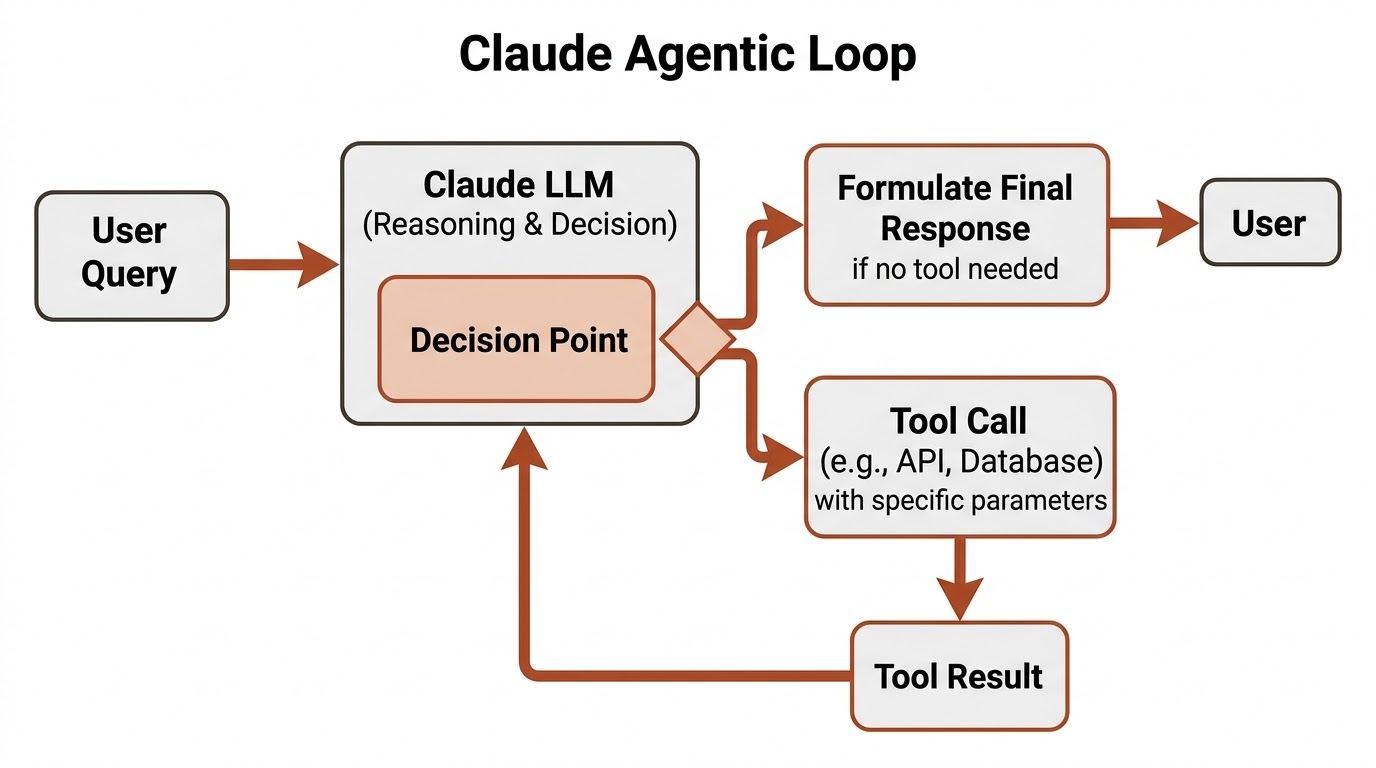
The fundamental workflow of a Claude AI agent follows an iterative cycle, often referred to as the agentic loop. This loop allows the agent to dynamically respond to user input and external information.
The process typically begins with a user query, which is sent to Claude. Claude then analyzes the query and its internal knowledge, determining if it needs additional information or an external action to fulfill the request.
If an external action is required, Claude intelligently calls a defined tool or API with specific parameters. The tool executes its function and returns a result back to Claude, which then processes this new information.
Based on the tool's output and its ongoing reasoning, Claude formulates a final, informed response to the user. This iterative decision-making process, where Claude decides when to act externally, is central to its agentic capabilities.
To begin building Claude agents, you'll need a Python development environment set up. Ensure you have Python 3.9 or newer installed on your system.
The primary library you'll need is anthropic, which provides the Python client for interacting with Claude's API. It's also good practice to use python-dotenv for securely managing your API keys.
First, install these libraries using pip. Then, obtain your Anthropic API key from the Anthropic console and store it securely as an environment variable, typically in a .env file.
pip install anthropic python-dotenvCreate a .env file in your project root and add your API key:
ANTHROPIC_API_KEY="your_anthropic_api_key_here"Now, you can initialize the Anthropic client in your Python code, ensuring it can connect to the Claude API.
import os
from dotenv import load_dotenv
from anthropic import Anthropic

# Load environment variables from .env file
load_dotenv()

# Initialize the Anthropic client using the API key from environment variables
# The client automatically picks up ANTHROPIC_API_KEY from os.environ
client = Anthropic()

print("Anthropic client initialized successfully.")
# You can test by making a simple call, though not strictly necessary for setup
# try:
#     response = client.messages.create(
#         model="claude-3-opus-20240229",
#         max_tokens=10,
#         messages=[
#             {"role": "user", "content": "Hello"
#         ]
#     )
#     print(f"Test response: {response.content[0].text")
# except Exception as e:
# print(f"Error during test call: {e")Tool use is a critical capability that extends Claude's intelligence beyond its training data, allowing it to interact with the real world. By providing Claude with access to external tools, you enable it to perform actions like fetching real-time data, sending emails, or updating databases.
These tools can be anything from simple Python functions to complex API integrations with external services like search engines, weather APIs, or custom application functions. The agent uses these tools to gather information or execute operations that it cannot perform intrinsically.
For instance, if a user asks for the current weather, Claude cannot answer from its internal knowledge. However, if provided with a get_current_weather tool, it can call that tool, get the information, and then formulate an accurate response.
To enable Claude to use a tool, you must define it using a JSON schema. This schema describes the tool's name, a clear description of its purpose, and the parameters it accepts, including their types and descriptions.
The description is crucial as Claude uses it to understand when and how to invoke the tool. A well-defined schema helps Claude accurately determine the correct tool and arguments for a given user request.
import json

# Define a simple tool function for a calculator
def calculator(expression: str) -> str:
    """Evaluates a mathematical expression and returns the result."""
    try:
        # Using eval() for demonstration; in production, use a safer parser
        result = eval(expression)
        return str(result)
    except Exception as e:
        return f"Error evaluating expression: {e"

# Define the tool's JSON schema for Claude
calculator_tool_schema = {
    "name": "calculator",
    "description": "A tool to evaluate mathematical expressions. Input a string containing a valid mathematical expression.",
    "input_schema": {
        "type": "object",
        "properties": {
            "expression": {
                "type": "string",
                "description": "The mathematical expression to evaluate (e.g., '2 + 2 * 3')."

        ,
        "required": ["expression"]


# You can define a mapping of tool names to their actual functions
available_tools = {
    "calculator": calculator


print("Calculator tool schema defined:")
print(json.dumps(calculator_tool_schema, indent=2))
print("\nAvailable tools mapping created.")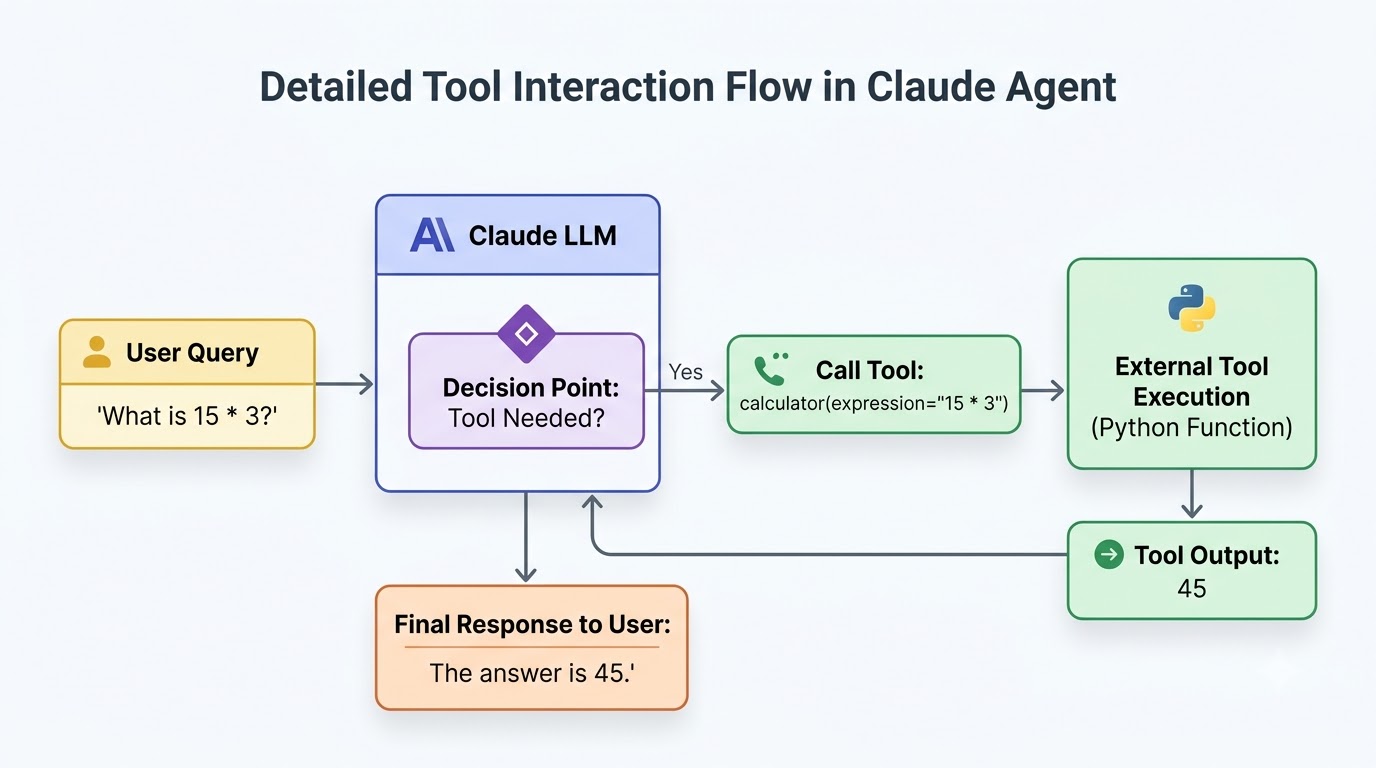
Building a Claude agent involves an iterative loop where Claude makes decisions, potentially calls tools, and processes their results. This Python example demonstrates a basic agent that uses the calculator tool we defined earlier.
The agent will receive a user query, determine if the calculator tool is needed, execute it if so, and then provide a final answer. This showcases the core agentic workflow in a simplified manner.
import os
import json
from dotenv import load_dotenv
from anthropic import Anthropic
from anthropic.types import ToolUseBlock, ToolResultBlock

# Load environment variables
load_dotenv()

# Initialize the Anthropic client
client = Anthropic()

# --- Tool Definitions (re-using from previous block) ---
def calculator(expression: str) -> str:
    """Evaluates a mathematical expression and returns the result."""
    try:
        # In a real application, use a safer math parser (e.g., sympy, numexpr)
        result = eval(expression)
        return str(result)
    except Exception as e:
        return f"Error evaluating expression: {e"

calculator_tool_schema = {
    "name": "calculator",
    "description": "A tool to evaluate mathematical expressions. Input a string containing a valid mathematical expression.",
    "input_schema": {
        "type": "object",
        "properties": {
            "expression": {
                "type": "string",
                "description": "The mathematical expression to evaluate (e.g., '2 + 2 * 3')."

        ,
        "required": ["expression"]


available_tools = {
    "calculator": calculator

# --- End Tool Definitions ---

def run_claude_agent(user_query: str):
    print(f"\nUser: {user_query")
    messages = [
        {"role": "user", "content": user_query
    ]

    while True:
        # Step 1: Send the current messages to Claude with available tools
        response = client.messages.create(
            model="claude-3-opus-20240229", # Or another suitable Claude model
            max_tokens=1024,
            messages=messages,
            tools=[calculator_tool_schema] # Provide the tool schema
        )

        # Step 2: Process Claude's response
        # Check if Claude wants to use a tool
        if response.stop_reason == "tool_use":
            tool_use = next(block for block in response.content if isinstance(block, ToolUseBlock))
            toolₙame = tool_use.name
            toolᵢnput = tool_use.input

            print(f"Claude decided to use tool: {toolₙame with input: {json.dumps(toolᵢnput)")

            # Step 3: Execute the tool
            if toolₙame in available_tools:
                tool_function = available_tools[toolₙame]
                tool_result = tool_function(**toolᵢnput)
                print(f"Tool '{toolₙame' executed. Result: {tool_result")

                # Step 4: Add tool result back to messages for Claude to process
                messages.append({
                    "role": "assistant",
                    "content": response.content # Include Claude's tool_use message
                )
                messages.append({
                    "role": "user",
                    "content": [
                        {
                            "type": "tool_result",
                            "tool_useᵢd": tool_use.id,
                            "content": tool_result

                    ]
                )
            else:
                error_message = f"Error: Tool '{toolₙame' not found."
                print(error_message)
                messages.append({
                    "role": "assistant",
                    "content": response.content
                )
                messages.append({
                    "role": "user",
                    "content": [
                        {
                            "type": "tool_result",
                            "tool_useᵢd": tool_use.id,
                            "content": error_message

                    ]
                )

        # If Claude doesn't want to use a tool, it provides a final answer
        elif response.stop_reason == "end_turn":
            final_answer = next(block.text for block in response.content if hasattr(block, 'text'))
            print(f"Claude: {final_answer")
            break # Exit the loop, task completed
        else:
            print(f"Unexpected stop reason: {response.stop_reason")
            print(f"Claude's response: {response.content[0].text")
            break

# Example usage of the agent
run_claude_agent("What is 123 + 456 * 2?")
run_claude_agent("What is the capital of France?")
run_claude_agent("Calculate (50 - 10) / 8.")Retrieval Augmented Generation (RAG) is a powerful technique that significantly enhances an agent's ability to access and utilize information beyond its initial training data. RAG allows agents to retrieve relevant context from external knowledge bases before generating a response.
This is particularly useful for incorporating private documents, proprietary data sources, or up-to-date information that Claude wouldn't otherwise know. By fetching specific, relevant snippets, RAG helps reduce hallucinations and improves the factual accuracy of agent responses.
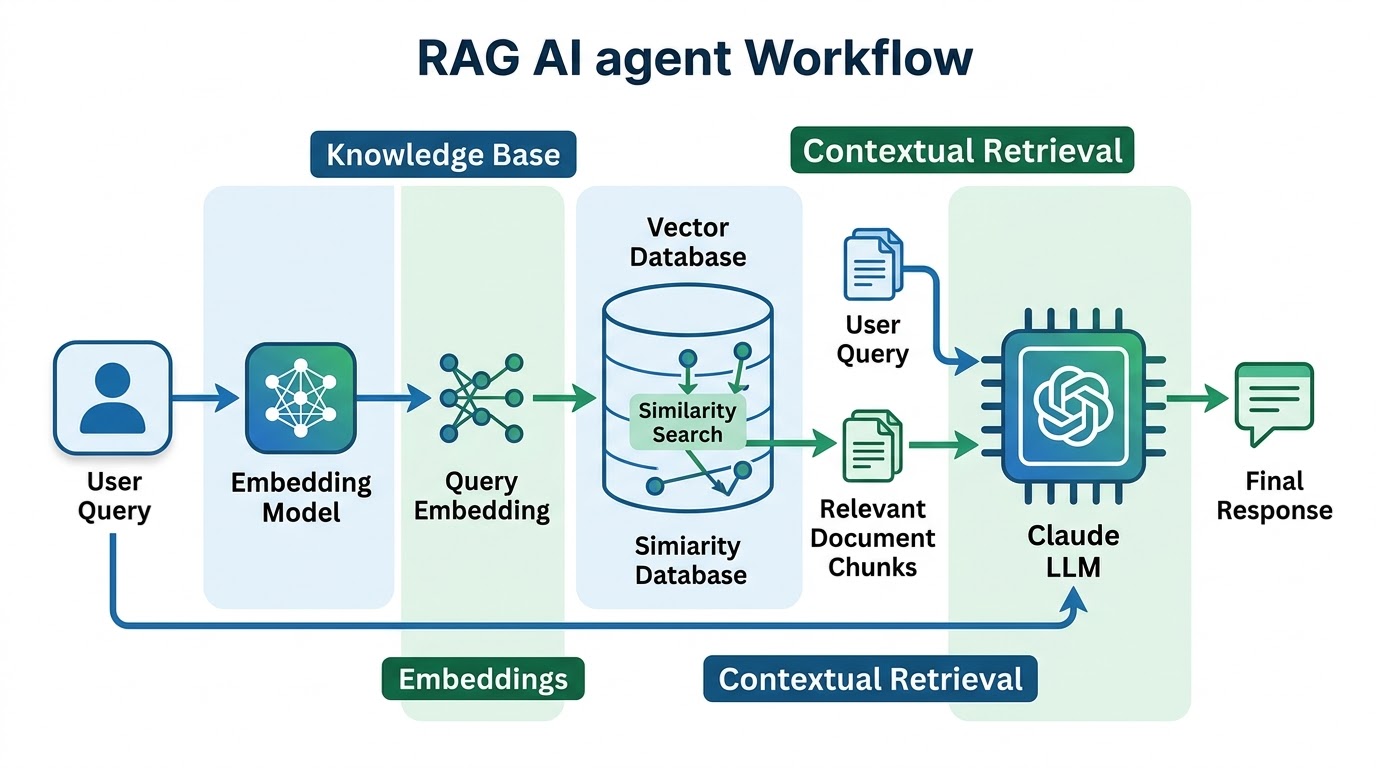
The process typically involves converting documents into numerical representations called embeddings, which are then stored in a vector database. When a query comes in, its embedding is used to find the most semantically similar documents in the database.
These retrieved documents are then passed to Claude as additional context, enabling the agent to generate a more informed and precise answer. This effectively provides agents with a form of long-term memory, allowing them to draw upon vast amounts of external data.
The Model Context Protocol (MCP) offers a standardized and secure framework for AI models like Claude to interact with external tools, data sources, and enterprise systems. It provides a structured way for models to request and receive information or execute actions.
MCP enhances interoperability and data governance by defining clear interfaces and communication protocols. This allows organizations to expose specific functionalities or data securely to AI agents without granting them direct, unrestricted access to underlying systems.
For example, an MCP server could act as a controlled gateway, providing a Claude agent with structured access to a company's CRM database, internal file system, or specific business application functions. The agent would send an MCP-compliant request, and the server would handle the secure execution and data retrieval.
# Conceptual Pseudo-code for an MCP server providing data access

class MCPDatabaseServer:
    def _ᵢnit__(self, db_connection_string):
        self.db_connection_string = db_connection_string
        # In a real scenario, establish a secure database connection

    def get_customerᵢnfo(self, customerᵢd: str) -> dict:
        """Retrieves customer details from the database."""
        print(f"MCP Server: Querying database for customerᵢd: {customerᵢd")
        # Simulate database query
        if customerᵢd == "CUST123":
            return {"id": "CUST123", "name": "Alice Smith", "email": "alice@example.com"
        return {"error": "Customer not found"

    def get_product_stock(self, product_sku: str) -> int:
        """Retrieves current stock level for a product."""
        print(f"MCP Server: Querying stock for product_sku: {product_sku")
        # Simulate database query
        if product_sku == "PROD001":
            return 150
        return 0

# --- How a Claude agent might conceptually interact via MCP ---
# Claude's tool definition for MCP interaction (simplified)
mcp_tool_schema = {
    "name": "mcp_data_access",
    "description": "Accesses enterprise data via Model Context Protocol.",
    "input_schema": {
        "type": "object",
        "properties": {
            "action": {"type": "string", "enum": ["get_customerᵢnfo", "get_product_stock"],
            "params": {"type": "object"
        ,
        "required": ["action", "params"]


# In the agent's loop, if Claude calls 'mcp_data_access':
def handle_mcp_call(action: str, params: dict):
    mcp_server = MCPDatabaseServer("secure_db_conn_str")
    if action == "get_customerᵢnfo":
        return mcp_server.get_customerᵢnfo(**params)
    elif action == "get_product_stock":
        return mcp_server.get_product_stock(**params)
    else:
        return {"error": "Invalid MCP action"

print("Conceptual MCP server and interaction logic defined.")Claude AI agents are transforming various industries by automating complex tasks and providing intelligent assistance. Their ability to reason, use tools, and integrate external data makes them incredibly versatile.
For instance, in customer support, agents can resolve common queries, escalate complex issues, and even process refunds by interacting with CRM and payment systems. This significantly reduces response times and improves customer satisfaction.
Research assistants powered by Claude can summarize academic papers, extract key findings, and even generate hypotheses by querying scientific databases and internal knowledge repositories. Coding agents can debug code, generate test cases, and refactor existing codebases by interacting with IDEs and version control systems.
Other applications include document analysis for legal or financial sectors, automating business processes like invoice processing, and performing complex data analysis by integrating with analytics tools. They also excel as internal knowledge assistants, providing instant answers from company wikis and documents.
| Use Case | Primary Function | Key Benefits | Example Tools Used |
|---|---|---|---|
| Intelligent Customer Support | Automate query resolution, escalate issues | Faster responses, improved satisfaction | CRM APIs, Payment Gateways, Knowledge Base |
| Research Assistant | Summarize, extract, synthesize information | Accelerated research, deeper insights | Academic Databases, Document Parsers, Web Search |
| Coding Agent | Debug, generate code, refactor | Increased developer productivity, code quality | IDEs, Version Control (Git), Testing Frameworks |
| Business Process Automation | Automate workflows, data entry | Reduced manual effort, operational efficiency | ERP Systems, RPA Tools, Email APIs |
| Data Analysis Assistant | Interpret data, generate reports | Faster insights, data-driven decisions | BI Tools, Database Connectors, Spreadsheet APIs |
| Internal Knowledge Assistant | Provide instant answers from internal docs | Improved employee productivity, knowledge sharing | Document Management Systems, Intranet Search |
Deploying AI agents in production requires careful consideration of security, reliability, and cost. Security starts with protecting API keys and credentials, ensuring they are never hardcoded and are managed through secure environment variables or secrets management services.
Tool permissions must be carefully scoped; agents should only have access to the minimum necessary functions and data. Input validation is also crucial to prevent malicious inputs from exploiting tools or causing unintended actions.
For reliability, implement robust error handling for API calls and tool executions, including retry mechanisms for transient failures. Comprehensive monitoring and logging are essential to observe agent behavior, diagnose issues, and ensure consistent performance.
Cost management involves optimizing token usage by crafting concise prompts and responses, and controlling unnecessary tool calls. Agents should not have unrestricted access to sensitive systems; instead, interactions should be mediated and logged to maintain control and auditability.
| Area | Best Practices | Common Pitfalls |
|---|---|---|
| Security | API key protection (env vars, secrets manager), granular tool permissions, input validation, audit logging | Hardcoding credentials, overly broad tool access, lack of input sanitization |
| Reliability | Robust error handling, retry mechanisms, comprehensive monitoring, graceful degradation | Ignoring API errors, no fallbacks, insufficient logging, lack of testing |
| Cost Management | Token optimization, intelligent tool call throttling, caching, prompt engineering for efficiency | Verbose prompts, redundant tool calls, no usage tracking, inefficient RAG retrieval |
Building powerful AI agents with Anthropic Claude involves leveraging its advanced reasoning capabilities as the core intelligence. Claude acts as the brain, interpreting requests, making decisions, and orchestrating complex workflows.
External APIs, custom tools, RAG systems, databases, and the Model Context Protocol (MCP) provide the agent with essential external capabilities and context. These components allow Claude to interact with the real world, retrieve up-to-date information, and perform actions beyond its inherent knowledge.
Ultimately, successful AI agents require both a highly capable LLM like Claude and a thoughtfully designed, controlled, and secure workflow. By combining these elements, developers can unlock the full potential of AI to create truly intelligent and autonomous systems that drive innovation.
While powerful, AI agents can face challenges such as hallucination, where they generate incorrect or nonsensical information. They can also struggle with complex reasoning tasks that require deep domain expertise or common-sense understanding beyond their training data. Managing the cost of API calls for extensive tool use and ensuring robust error handling in multi-step workflows are also significant considerations for developers.
Selecting the right tools involves evaluating several factors, including the specific tasks the agent needs to perform and the reliability of the external APIs. Consider the latency of tool responses, the security implications of granting access to external systems, and the ease of integrating the tool's output back into Claude's reasoning process. Prioritize tools that are well-documented, have clear error handling, and align with your application's security requirements.
A single AI agent typically operates independently to achieve a specific goal, leveraging an LLM, tools, and memory. In contrast, a multi-agent system involves multiple AI agents collaborating, each potentially specialized for different tasks or roles. These agents communicate and coordinate to solve more complex problems that a single agent might find challenging, often mimicking human team dynamics to achieve a shared objective.
Debugging agent interactions requires careful logging of Claude's prompts, tool calls, and tool outputs at each step of the agentic loop. Implement detailed print statements or a dedicated logging framework to trace the flow of information and decisions. Tools like LangChain's tracing or custom logging dashboards can help visualize the agent's thought process, identify where it deviates from expected behavior, or fails to use a tool correctly.
Discover how to earn $1000 monthly leveraging Claude Co-work. This guide shows normal people how to start a profitable content creation business step-by-step
Find the top AI transcription APIs for Indian languages like Hindi, Gujarati, and Tamil. We compare accuracy, speed, features, and pricing to guide your choice
Discover OpenAI's GPT-6 Astra. Learn how this AI outperforms Claude Fable and Meta AI in performance, features, and real-world applications with comparisons