>_Programming Partner
Loading technical insights...
Loading technical insights...
Software Developer
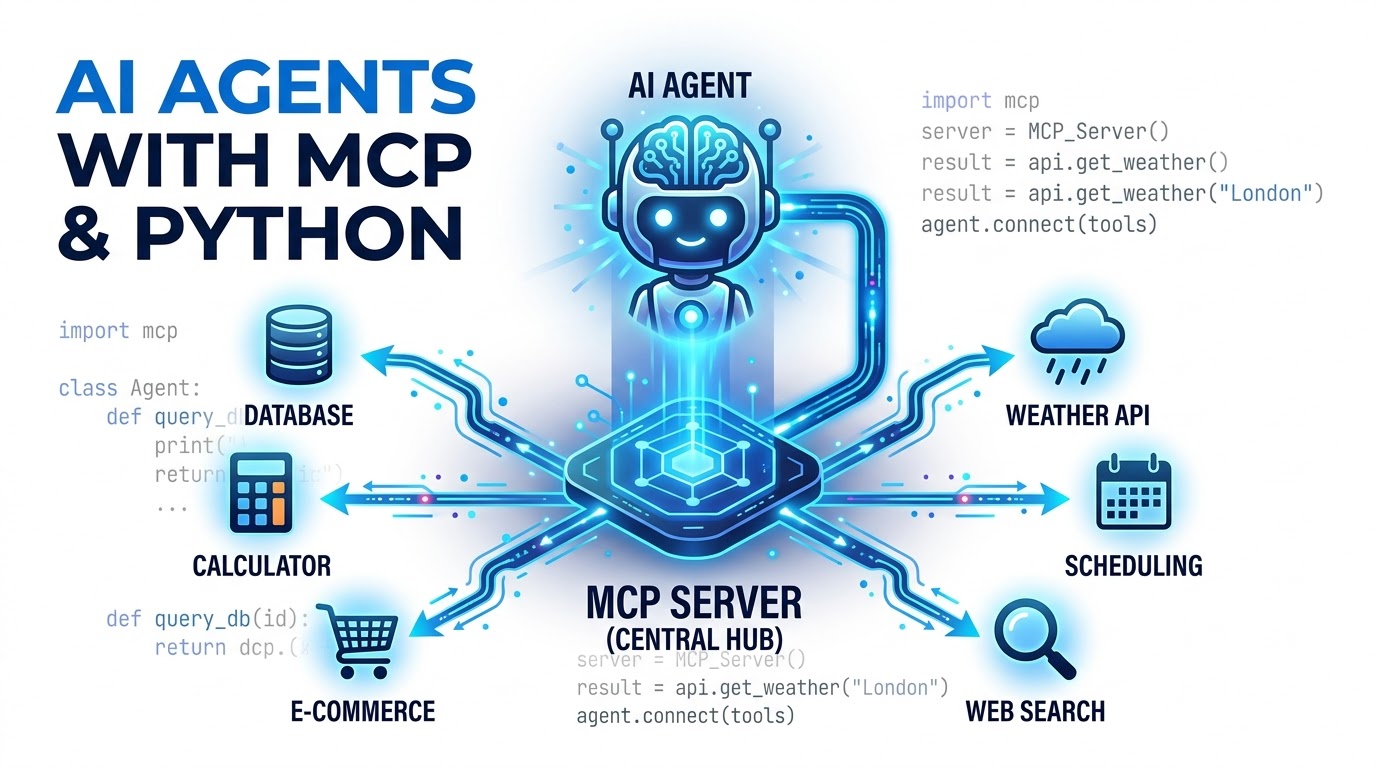
AI agents are intelligent systems that can perceive their environment, make decisions, and take actions to achieve specific goals. While Large Language Models (LLMs) provide impressive reasoning capabilities, they often lack real-time information or the ability to perform complex calculations.
This limitation means LLMs cannot directly interact with external systems like databases, APIs, or custom tools. To overcome this, AI agents need a way to access and utilize external functionalities and data sources.
The Machine-to-Cognition Protocol (MCP) offers a standardized method for AI applications to discover and use external tools. This tutorial will guide you through building a simple yet powerful MCP-powered AI agent using Python, enabling it to interact with the outside world.
Integrating external tools into an AI agent requires a clear architectural pattern. The core components typically include the LLM, the AI agent orchestrator, an MCP client, an MCP server, and the actual external tools or services.
The LLM acts as the brain, interpreting user requests and deciding if an external tool is needed. The AI agent orchestrator manages the overall flow, communicating with the LLM and the MCP client.
The MCP client allows the agent to discover available tools and send requests to the MCP server. The MCP server, in turn, acts as a registry and dispatcher, routing requests to the appropriate external tools, APIs, or databases.
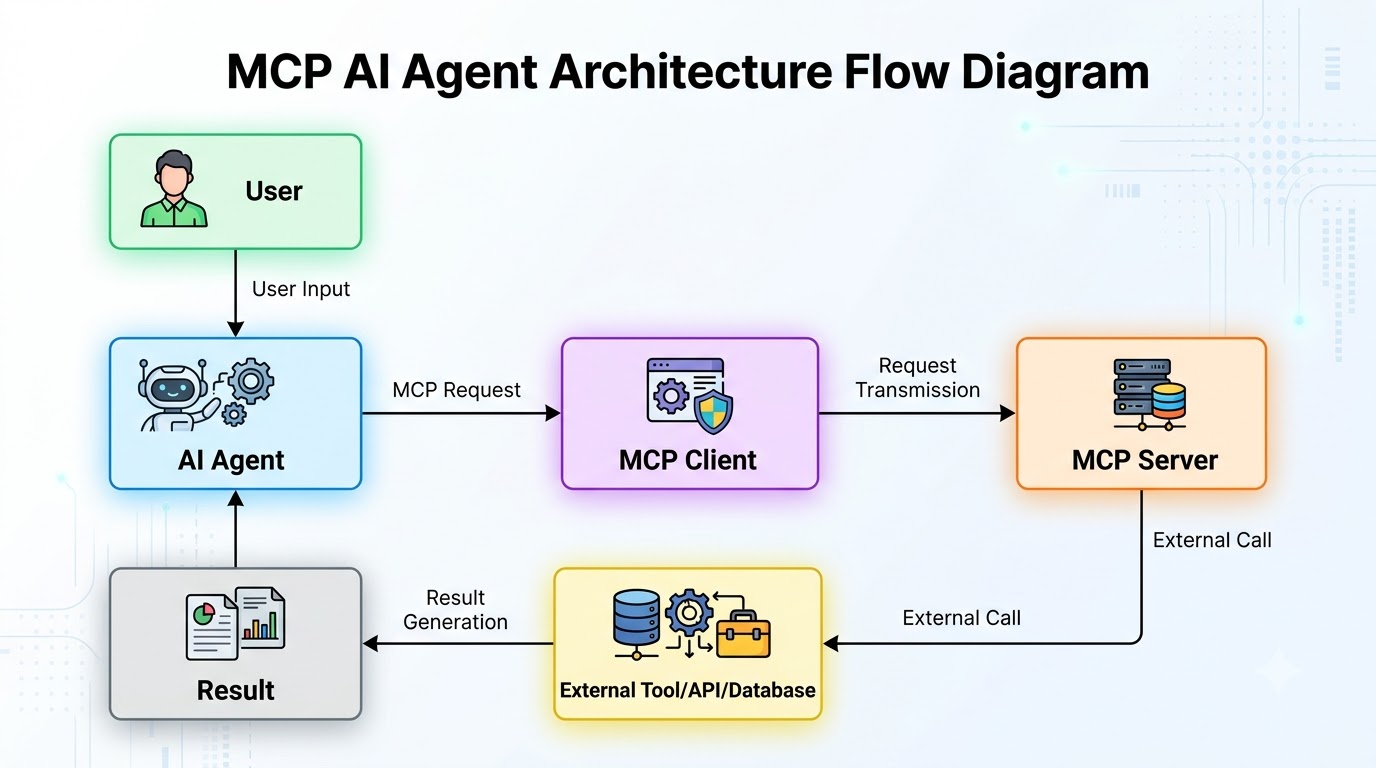
Our project involves creating an AI agent capable of performing simple calculations using an external tool. This agent will demonstrate how to register a tool with an MCP server, connect an agent to that server, and orchestrate tool calls based on user input.
The final agent will be able to answer general questions using its LLM and accurately perform arithmetic operations like addition and subtraction by calling our custom MCP tool. This showcases the seamless integration of external capabilities.
We recommend using Python 3.9 or newer for this project. Start by creating a virtual environment to manage your dependencies cleanly.
python3 -m venv venv
source venv/bin/activate
Next, install the necessary packages. We'll need mcp-sdk for MCP functionalities and google-generativeai to interact with a powerful LLM.
pip install mcp-sdk google-generativeai python-dotenvCreate a .env file in your project root to store your Google API key securely. Replace YOUR_GOOGLE_API_KEY with your actual key.
GOOGLE_API_KEY="YOUR_GOOGLE_API_KEY"Organize your project with a simple directory structure. This helps keep your server, tools, and agent code separate and manageable.
my_mcp_agent/
├── .env
├── mcp_server.py
├── agent.py
└── tools/
└── calculator.pyThe MCP server is responsible for hosting and exposing our custom tools to the AI agent. It acts as a central registry where tools are defined with their capabilities, inputs, and expected outputs.
We will create a basic MCP server using the mcp-sdk. This server will initialize, register our calculator tool, and then start listening for incoming requests from the agent.
Create a file named mcp_server.py in your project root. This file will contain the logic for our MCP server.
import asyncio
from mcp_sdk.server import MCPServer
from tools.calculator import add, subtract

async def main():
    # Initialize the MCP server
    server = MCPServer()

    # Register the 'add' tool
    # The tool is described with its name, description, and input schema.
    server.register_tool(
        name="add",
        description="Adds two numbers together.",
        input_schema={
            "type": "object",
            "properties": {
                "a": {"type": "number", "description": "The first number",
                "b": {"type": "number", "description": "The second number"
            ,
            "required": ["a", "b"]
        ,
        func=add
    )

    # Register the 'subtract' tool
    # Similar to 'add', it defines its purpose and required parameters.
    server.register_tool(
        name="subtract",
        description="Subtracts the second number from the first.",
        input_schema={
            "type": "object",
            "properties": {
                "a": {"type": "number", "description": "The number to subtract from",
                "b": {"type": "number", "description": "The number to subtract"
            ,
            "required": ["a", "b"]
        ,
        func=subtract
    )

    # Start the MCP server on a specified port
    print("Starting MCP server on port 8000...")
    await server.start(port=8000)

if _ₙame__ == "__main__":
    asyncio.run(main())
In this code, MCPServer() creates an instance of our server. We then use server.register_tool() to add our add and subtract functions as discoverable tools.
Each tool registration includes a name, a description (crucial for the LLM to understand its purpose), and an input_schema. The input_schema uses JSON Schema to define the expected parameters, ensuring structured and valid inputs.
Our MCP server needs actual functions to expose as tools. These functions will perform the specific tasks our AI agent needs, such as calculations.
Create a tools directory and inside it, a file named calculator.py. This file will house our simple arithmetic functions.
# tools/calculator.py

def add(a: float, b: float) -> float:
    """Adds two numbers together."""
    print(f"Executing add tool with a={a, b={b")
    return a + b

def subtract(a: float, b: float) -> float:
    """Subtracts the second number from the first."""
    print(f"Executing subtract tool with a={a, b={b")
    return a - b
These functions are straightforward Python code. The MCP server handles calling them with the arguments parsed from the agent's request, based on the input_schema we defined earlier.
The structured inputs and outputs, defined by the JSON schemas, are vital. They allow the AI agent and the underlying LLM to understand precisely what data to provide to a tool and what kind of result to expect back.
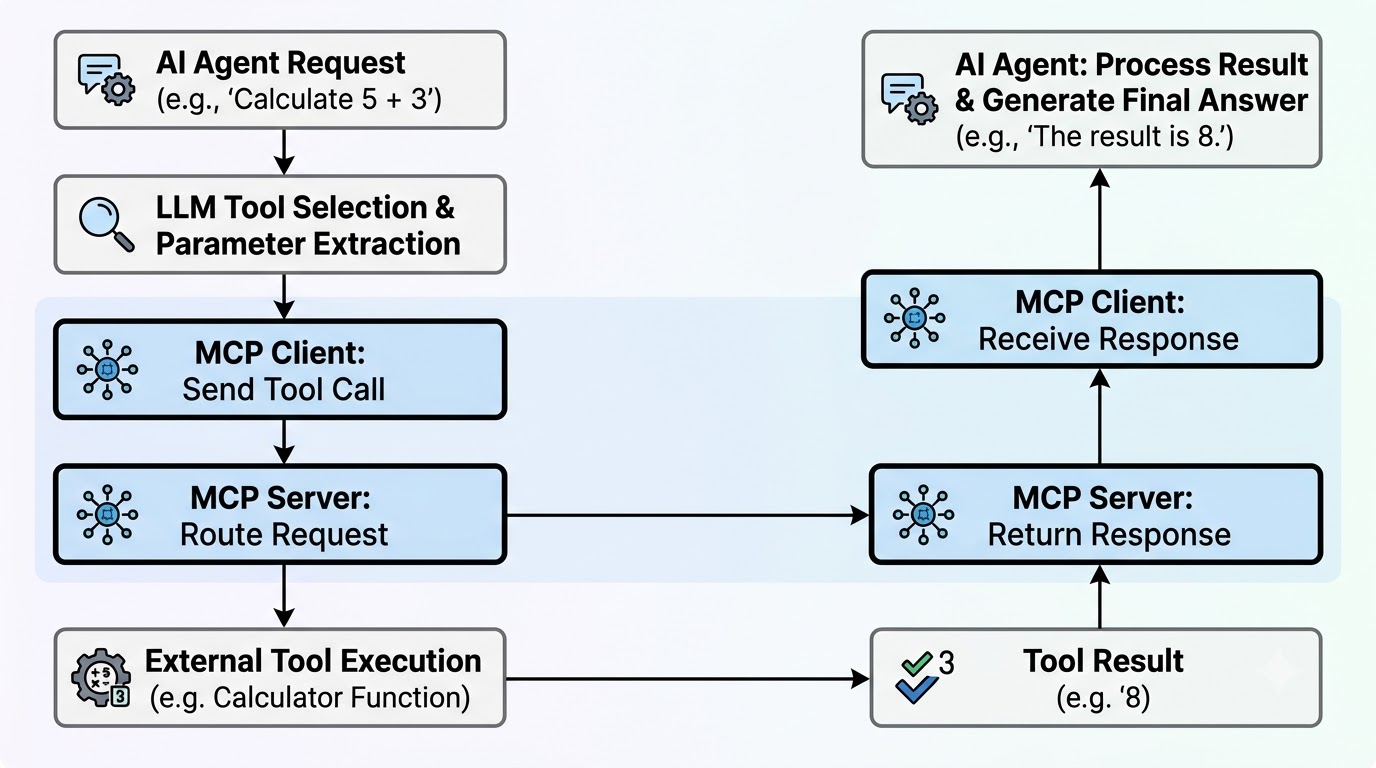
Now, let's build the AI agent that will interact with our MCP server. This agent will use the mcp-sdk client to discover available tools and a Google Generative AI model to decide when and how to use them.
The agent's primary role is to act as an intermediary. It takes a user's query, consults the LLM, and if a tool is required, it fetches the tool's definition from the MCP server and executes it.
Create a file named agent.py in your project root. This file will contain the logic for our AI agent.
import asyncio
import os
import google.generativeai as genai
from mcp_sdk.client import MCPClient
from dotenv import load_dotenv

# Load environment variables from .env file
load_dotenv()

class AIAgent:
    def _ᵢnit__(self, mcp_server_url: str):
        # Configure Google Generative AI with API key
        genai.configure(api_key=os.getenv("GOOGLE_API_KEY"))
        self.model = genai.GenerativeModel('gemini-pro')

        # Initialize MCP client to connect to the server
        self.mcp_client = MCPClient(mcp_server_url)
        self.tools = {
        self.tool_definitions = []

    async def discover_tools(self):
        # Discover tools from the MCP server
        print(f"Connecting to MCP server at {self.mcp_client.server_url to discover tools...")
        discovered_tools = await self.mcp_client.discover_tools()

        # Store tool functions and their definitions for the LLM
        for toolᵢnfo in discovered_tools:
            toolₙame = toolᵢnfo['name']
            self.tools[toolₙame] = toolᵢnfo # Store the full tool info

            # Create a tool definition suitable for the LLM
            self.tool_definitions.append(genai.protos.Tool(
                function_declarations=[
                    genai.protos.FunctionDeclaration(
                        name=toolₙame,
                        description=toolᵢnfo['description'],
                        parameters=genai.protos.Schema(**toolᵢnfo['input_schema'])
                    )
                ]
            ))
        print(f"Discovered {len(self.tools) tools: {list(self.tools.keys())")

    async def chat(self, query: str) -> str:
        # Start a chat session with the LLM, providing tool definitions
        chat_session = self.model.start_chat(tools=self.tool_definitions)

        # Send the user query to the LLM
        response = await chat_session.send_message(query)

        # Check if the LLM decided to call a tool
        if response.candidates[0].content.parts[0].function_call:
            function_call = response.candidates[0].content.parts[0].function_call
            toolₙame = function_call.name
            tool_args = {k: v for k, v in function_call.args.items()

            print(f"LLM decided to call tool: {toolₙame with args: {tool_args")

            # Execute the tool via MCP client
            tool_result = await self.mcp_client.call_tool(toolₙame, tool_args)
            print(f"Tool '{toolₙame' returned: {tool_result")

            # Send the tool result back to the LLM for final response generation
            tool_response = await chat_session.send_message(
                genai.protos.Part(function_response=genai.protos.FunctionResponse(
                    name=toolₙame,
                    response={'result': tool_result
                ))
            )
            return tool_response.text
        else:
            # If no tool call, return the LLM's direct response
            return response.text

async def main():
    # Initialize the agent and discover tools
    agent = AIAgent("http://localhost:8000")
    await agent.discover_tools()

    # Example interaction (will be used in the running section)
    # print(await agent.chat("What is 5 plus 3?"))
    # print(await agent.chat("Tell me a fun fact about space."))

if _ₙame__ == "__main__":
    asyncio.run(main())
The AIAgent class initializes the LLM and the MCPClient. The discover_tools method connects to the MCP server and retrieves all registered tool definitions.
These definitions, including the tool's name, description, and input schema, are then formatted into a structure the LLM can understand. This allows the LLM to intelligently decide when to invoke a tool.
The chat method in our AIAgent orchestrates the entire process of handling a user query. It involves sending the query to the LLM, detecting if a tool call is suggested, executing that tool, and then feeding the result back to the LLM.
When a user asks a question, the LLM first analyzes it. If the query requires an external capability (like a calculation), the LLM will respond with a FunctionCall object, specifying which tool to use and with what arguments.
Our agent then intercepts this FunctionCall. It extracts the tool name and arguments, then uses the mcp_client.call_tool() method to execute the tool on the MCP server.
Once the tool returns a result, the agent sends this result back to the LLM. This allows the LLM to incorporate the tool's output into its final, natural language response to the user.
# Continued from previous block (agent.py) - Focus on the chat method logic

# ... (inside AIAgent class)
    async def chat(self, query: str) -> str:
        # 1. Start a chat session with the LLM, providing tool definitions
        # The LLM uses these definitions to decide if a tool is needed.
        chat_session = self.model.start_chat(tools=self.tool_definitions)

        # 2. Send the user query to the LLM
        response = await chat_session.send_message(query)

        # 3. Check if the LLM decided to call a tool
        if response.candidates[0].content.parts[0].function_call:
            function_call = response.candidates[0].content.parts[0].function_call
            toolₙame = function_call.name
            tool_args = {k: v for k, v in function_call.args.items()

            print(f"\nLLM decided to call tool: {toolₙame with args: {tool_args")

            # 4. Execute the tool via MCP client
            # The MCP client sends the request to the MCP server, which runs the tool.
            tool_result = await self.mcp_client.call_tool(toolₙame, tool_args)
            print(f"Tool '{toolₙame' returned: {tool_result")

            # 5. Send the tool result back to the LLM for final response generation
            # This allows the LLM to contextualize the tool's output.
            tool_response = await chat_session.send_message(
                genai.protos.Part(function_response=genai.protos.FunctionResponse(
                    name=toolₙame,
                    response={'result': tool_result
                ))
            )
            return tool_response.text
        else:
            # 6. If no tool call, return the LLM's direct response
            return response.text
# ... (rest of the agent.py file)To see our AI agent in action, you need to run both the MCP server and the agent simultaneously. Open two separate terminal windows for this.
In your first terminal, navigate to the my_mcp_agent directory and run the MCP server. This will make our add and subtract tools available.
source venv/bin/activate
python mcp_server.py
You should see output indicating the server is starting on port 8000.
In your second terminal, also navigate to the my_mcp_agent directory. Now, modify agent.py to include an interactive loop for testing.
# agent.py (updated main function for interactive testing)

# ... (rest of the AIAgent class and imports)

async def main():
    agent = AIAgent("http://localhost:8000")
    await agent.discover_tools()

    print("\nAI Agent is ready! Type 'exit' to quit.")
    while True:
        user_query = input("\nYou: ")
        if user_query.lower() == 'exit':
            break

        agent_response = await agent.chat(user_query)
        print(f"Agent: {agent_response")

if _ₙame__ == "__main__":
    asyncio.run(main())
Now, run the agent. You can interact with it directly from the terminal.
source venv/bin/activate
python agent.pyLet's test two types of queries: one that needs a tool and one that doesn't.
First, ask a general knowledge question. The LLM should answer this directly without invoking any tools.
You: What is the capital of France?

# Expected Agent Output:
# Agent: The capital of France is Paris.
Next, ask a question that requires a calculation. Observe how the agent detects the need for a tool, calls it via MCP, and then uses the result to formulate its response.
You: What is 123 plus 456?

# Expected Agent Output (console output from agent.py):
# LLM decided to call tool: add with args: {'a': 123, 'b': 456
# Tool 'add' returned: 579
# Agent: 123 plus 456 is 579.
You can also try subtraction: "What is 100 minus 25?". The agent will correctly identify and use the subtract tool.
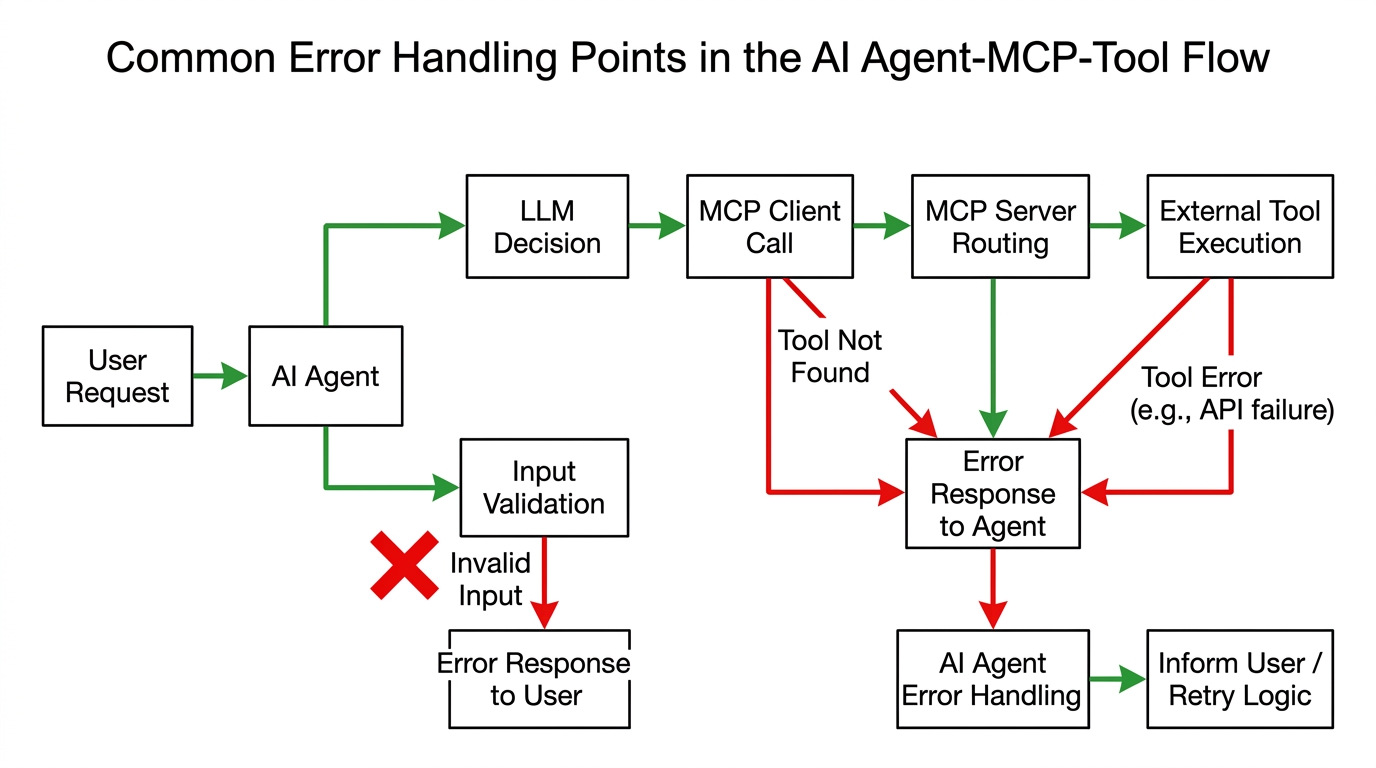
Building robust AI agents requires careful consideration of error handling and security. In a real-world scenario, tools might be unavailable, parameters could be invalid, or external APIs might fail.
Implement try-except blocks around tool calls to catch exceptions from the MCP server or the underlying tools. Provide informative error messages back to the LLM so it can gracefully handle failures or inform the user.
For example, if a tool expects numbers but receives text, the MCP server's schema validation should catch this. The agent should then communicate this validation error back to the LLM.
Security is paramount for production-grade agents. Always validate tool inputs rigorously, even after LLM generation, to prevent injection attacks or unintended operations.
Limit tool permissions to the absolute minimum required for their function. Never grant unrestricted access to sensitive systems or data. Protect API keys and credentials using environment variables or secure secrets management services.
Regularly audit tool usage and agent interactions to detect suspicious activity. Consider implementing user authentication and authorization if your agent interacts with personalized or sensitive data.
The agent we built is a foundational example. You can significantly enhance its capabilities by adding more sophisticated MCP tools. Consider tools for database queries, interacting with external APIs like weather services, or even managing files.
Implementing memory for conversational context is another crucial improvement. This allows the agent to remember previous interactions, making conversations more natural and coherent over time.
For production-grade applications, you might integrate user authentication and authorization. This ensures that only authorized users can access specific tools or perform sensitive operations.
The same MCP architecture can scale to support multiple MCP servers, each hosting different sets of tools. This modularity allows for distributed tool management and greater flexibility in complex environments.
MCP-powered agents are incredibly versatile and can be applied in numerous real-world scenarios. They can act as developer assistants, capable of looking up documentation, running tests, or even deploying code.
Customer support agents can leverage MCP to access CRM systems, order details, or knowledge bases to provide accurate and timely assistance. Database assistants can perform complex queries and data manipulations based on natural language commands.
Within organizations, internal company agents can automate workflows, manage calendars, or retrieve information from internal systems. Research agents can scour academic databases and summarize findings.
Finally, automation systems can use MCP to orchestrate tasks across various services, from smart home devices to complex industrial controls. MCP's standardization allows the same agent architecture to work seamlessly with diverse external tools, making it a powerful solution for extensible AI applications.
This tutorial demonstrated how Python, an LLM, an MCP client, and MCP servers can work in concert to create an AI agent capable of using external tools. We built a functional agent that can perform calculations by dynamically calling tools registered with an MCP server.
The benefits of MCP for tool discovery and standardization are clear. It provides a robust and scalable way for AI agents to extend their capabilities beyond the LLM's inherent knowledge, connecting them to the vast ecosystem of external services and data.
MCP becomes especially powerful when an agent needs to interact with multiple APIs, databases, and custom services. It offers a maintainable and scalable solution for developing complex, intelligent AI applications that truly interact with the world.
MCP provides a standardized, discoverable interface for tools, abstracting away individual API complexities. This simplifies agent development, allowing agents to dynamically find and use tools without hardcoding integrations. It also promotes reusability and easier maintenance of the tool ecosystem.
Yes, MCP is LLM and framework agnostic. It provides a universal interface for tools, meaning any LLM or agent framework capable of understanding tool schemas (like JSON Schema) can interact with an MCP server. This flexibility allows developers to swap out LLMs or agent architectures without re-implementing tool integrations.
MCP supports tool versioning through its schema definitions, allowing tools to evolve without breaking existing agents. When a tool is updated, its schema can be revised, and agents can be designed to query for specific versions or adapt to the latest available. This ensures backward compatibility and smooth transitions during tool development.
Production deployment challenges include ensuring high availability and scalability of both the MCP server and the underlying tools. Robust error handling, comprehensive logging, and monitoring are crucial for debugging and maintaining agent performance. Additionally, managing authentication and authorization for tool access securely is paramount.
Unlock Random Forest mastery with our Python guide. Explore core concepts, implementation, hyperparameters, and real-world applications for robust ML
Master Decision Trees in ML, learning their mechanics, splitting criteria, Python implementation, and overfitting prevention for classification and regression
Unlock the power of AI! Learn how embeddings transform text into numerical vectors, enabling semantic understanding for ChatGPT, RAG, and intelligent agents